Choosing the right data center cooling system requires more than matching cooling capacity to the facility’s total IT power consumption. The cooling architecture must also account for rack power density, airflow distribution, operating temperatures, redundancy requirements, available infrastructure, and future expansion.
A cooling system that works well in a conventional enterprise data center may not be suitable for an AI facility with high-density GPU racks. Similarly, installing liquid cooling without evaluating heat rejection infrastructure, coolant distribution, and equipment compatibility can create unnecessary engineering and operational challenges.
For data center owners and engineering teams, the objective is to select a cooling solution that maintains stable operating conditions, removes heat efficiently, supports equipment reliability, and accommodates future IT growth.
This guide explains how to evaluate different data center cooling systems, compare available technologies, calculate cooling requirements, and identify the most suitable configuration for your facility.
1. Understand Your Data Center’s Cooling Requirements Before Selecting Equipment
The first step in choosing a data center cooling system is understanding the facility’s actual thermal requirements.
Selecting equipment based only on floor area or total building capacity can result in insufficient cooling, unnecessary capital expenditure, or inefficient system operation.
Several factors should be evaluated before selecting cooling equipment.
1.1 Calculate the Total IT Heat Load
The IT heat load represents the thermal energy generated by servers, storage systems, networking equipment, and other IT devices.
For most data center design calculations, nearly all electrical power consumed by IT equipment ultimately becomes heat that must be removed from the facility.
A simplified conversion is:
For example, if a facility has an IT electrical load of 500 kW:
The estimated IT heat load is therefore 1,706,000 BTU/h.
However, this is not necessarily the complete facility cooling requirement.
The engineering calculation should also consider:
Lighting and electrical distribution losses.
UPS and power conversion losses.
Heat generated by other facility equipment.
Heat transfer through walls, roofs, and windows.
Outdoor air and ventilation loads.
Occupancy and operational conditions.
The final cooling capacity should be determined using the project’s design conditions and an appropriate engineering safety margin.
1.2 Evaluate Rack Power Density
Total IT load does not tell the entire story.
A facility with 500 kW distributed across 100 racks has a very different cooling challenge from one with 500 kW concentrated in 20 racks.
Rack Configuration | Average Power Density | Cooling Consideration |
|---|---|---|
100 racks / 500 kW | 5 kW/rack | Conventional room-level cooling may be suitable |
50 racks / 500 kW | 10 kW/rack | Airflow management and localized cooling become more important |
20 racks / 500 kW | 25 kW/rack | High-density cooling architecture may be required |
10 racks / 500 kW | 50 kW/rack | Evaluate advanced air cooling and liquid cooling |
Illustrative configurations, not universal cooling technology thresholds.
Rack power density helps determine whether conventional CRAC or CRAH systems can adequately remove heat or whether in-row cooling, rear door heat exchangers, or liquid cooling should be considered.
1.3 Identify Current and Future IT Requirements
Cooling infrastructure is a long-term investment. The selected system should accommodate expected changes in server configurations and computing workloads.
Before purchasing equipment, establish:
Current IT load and expected future IT load.
Average and maximum rack power density.
Number of racks and planned rack expansion.
Server inlet temperature requirements.
Airflow requirements and equipment layout.
Whether GPU servers or liquid-cooled equipment will be deployed.
Expected operating hours and environmental conditions.
A system designed only for today’s workload may become inadequate when additional GPU servers or high-performance computing equipment are installed.
2. Understand the Main Types of Data Center Cooling Systems
Different cooling technologies address different thermal management requirements. Understanding their working principles and limitations is essential when choosing the right configuration.
2.1 CRAC Systems: Precision Cooling for Smaller and Conventional Data Centers
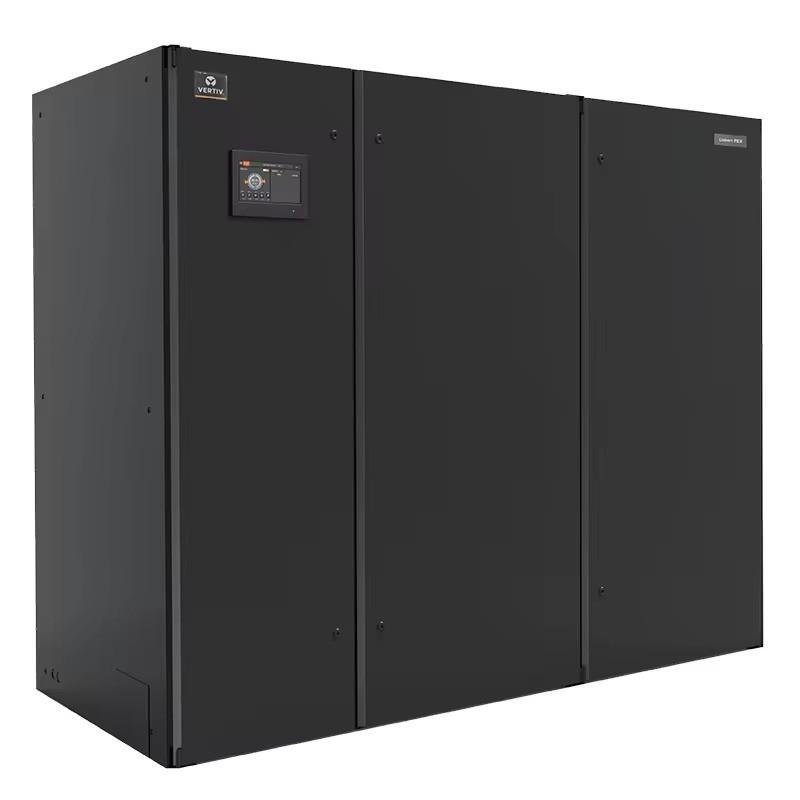
A Computer Room Air Conditioner (CRAC) is a precision air conditioning system designed for data center environments.
CRAC units typically use a refrigeration cycle to remove heat from the room. Depending on the configuration, heat may be rejected through an air-cooled condenser or a water-cooled condenser.
Typical applications include:
Enterprise server rooms.
Small and medium-sized data centers.
Telecommunications equipment rooms.
IT infrastructure facilities.
Data centers with relatively moderate rack power density.
Advantages:
Integrated refrigeration and temperature control.
Available in different cooling capacities and configurations.
Suitable for facilities requiring independent precision cooling.
Can provide temperature and humidity control when properly configured.
Limitations:
High-density racks can create localized hot spots.
Room-level cooling may become less efficient as heat density increases.
Compressor-based systems require appropriate heat rejection infrastructure.
CRAC systems are suitable when the facility’s heat load, airflow requirements, and equipment arrangement are compatible with room-based cooling.
2.2 CRAH Systems: Chilled-Water Cooling for Larger Facilities
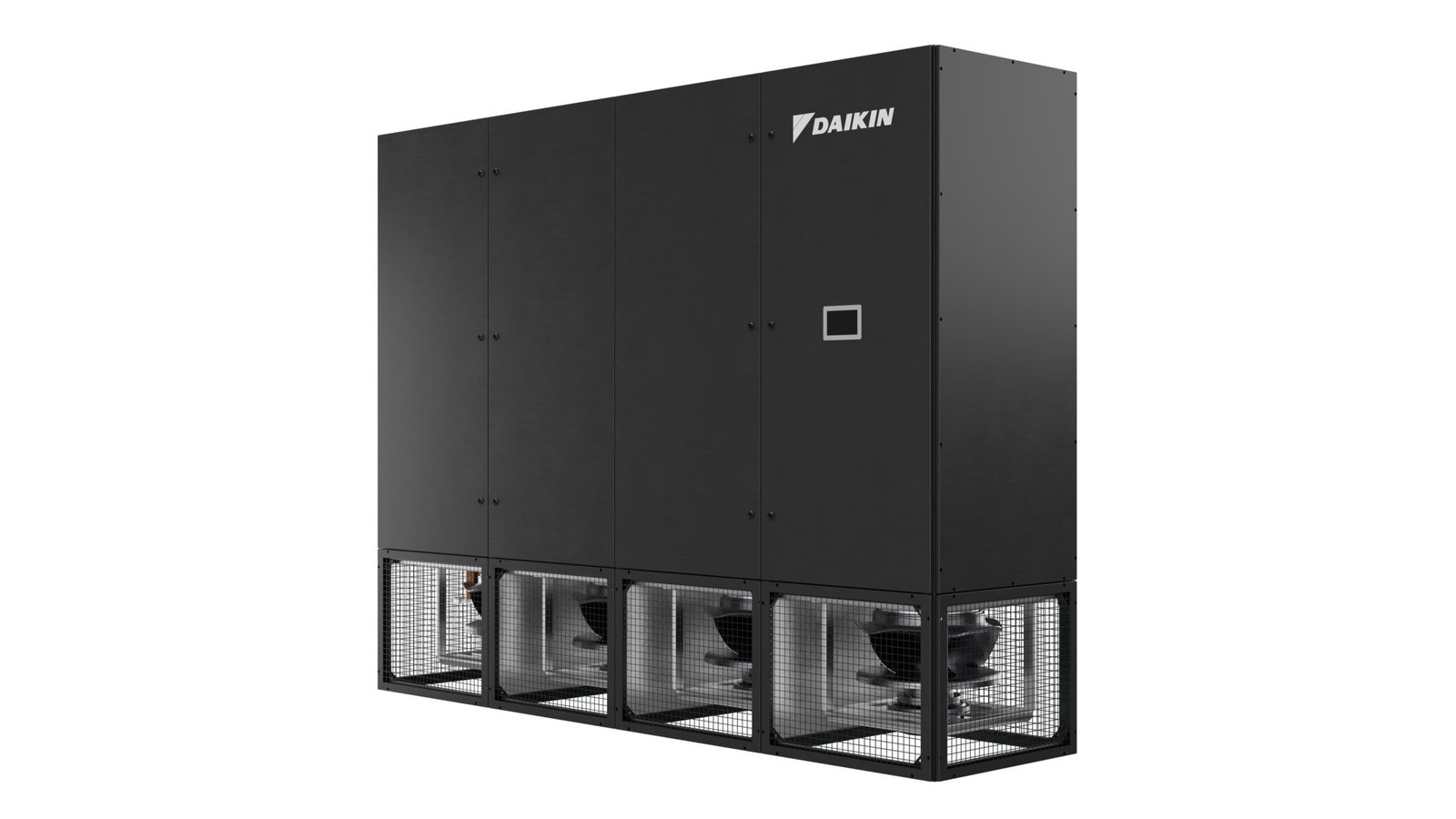
A Computer Room Air Handler (CRAH) uses chilled water supplied by a central chilled-water plant to cool the air.
Unlike a conventional DX CRAC unit, a CRAH typically does not contain its own refrigeration compressor. Instead, it uses a cooling coil to transfer heat from the return air into chilled water.
The heated water returns to the central cooling plant, where chillers reject the heat.
CRAH systems are commonly used in:
Large enterprise data centers.
Colocation facilities.
Hyperscale data centers.
Facilities with centralized chilled-water infrastructure.
Advantages:
Compatible with centralized chilled-water systems.
Supports large-scale cooling infrastructure.
Allows centralized management of cooling plant equipment.
Can be integrated with economizer and heat-rejection strategies where conditions permit.
Limitations:
Requires chilled-water piping and associated infrastructure.
Cooling performance depends on chilled-water supply conditions and flow.
Pumping systems and water treatment require ongoing maintenance.
Poor hydraulic balancing can reduce cooling performance.
CRAH systems are particularly appropriate when a facility already has, or plans to install, a centralized chilled-water system.
2.3 In-Row Cooling: Targeted Cooling for High-Density Server Racks
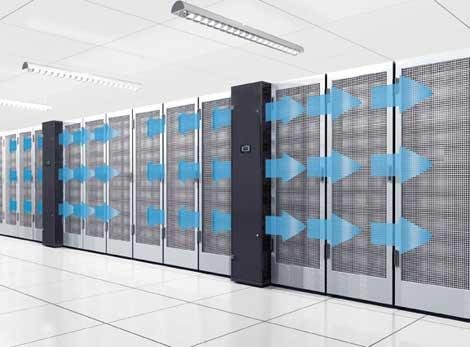
An in-row cooling system is installed between or alongside server racks to remove heat closer to where it is generated.
Instead of relying entirely on cooling units located around the perimeter of the room, in-row systems provide localized cooling.
They typically draw hot exhaust air from the rack area, cool it, and deliver conditioned air toward server intakes.
Common applications include:
High-density server environments.
Modular data centers.
Colocation facilities with varying rack densities.
Facilities experiencing localized hot spots.
Data centers requiring flexible cooling distribution.
Advantages:
Reduces the distance between heat generation and heat removal.
Improves localized temperature management.
Can help reduce hot-air recirculation.
Supports incremental cooling capacity expansion.
Limitations:
Requires careful rack and cooling unit arrangement.
Maintenance access must be considered.
Performance depends on airflow management and system configuration.
May require additional cooling capacity as rack density increases.
In-row cooling is worth evaluating when conventional room-level air conditioning struggles to maintain uniform temperatures across high-density server rows.
2.4 Rear Door Heat Exchangers: Removing Heat at the Rack Level
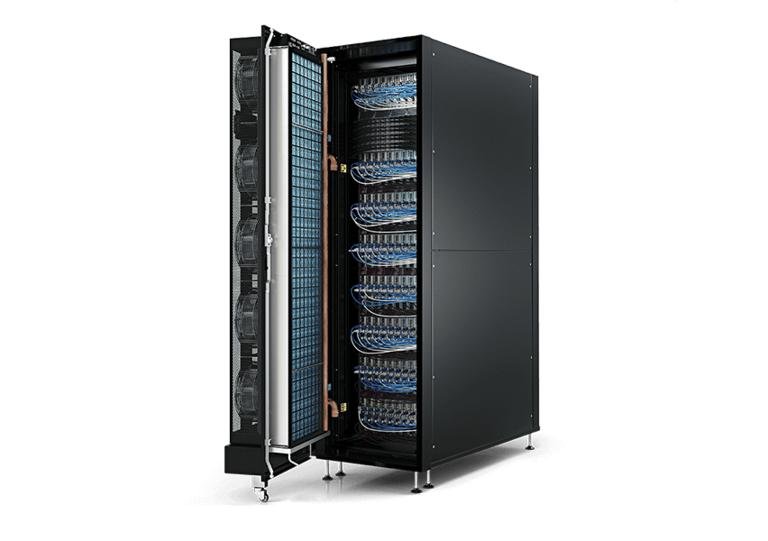
A Rear Door Heat Exchanger (RDHx) is installed on the rear of a server rack.
It uses a liquid-cooled heat exchanger to capture heat from the hot exhaust air leaving the servers.
The heated air passes through the rear door heat exchanger, transferring thermal energy to circulating water or another specified coolant.
This reduces the amount of heat released into the surrounding data center room.
Rear door heat exchangers are useful for:
High-density server racks.
Facilities with localized cooling challenges.
Data centers transitioning toward liquid-assisted cooling.
Existing facilities where room-level cooling infrastructure is difficult to replace.
Advantages:
Captures heat close to the source.
Can reduce room cooling demand.
Supports higher rack densities when properly engineered.
May be integrated into existing air-cooled server environments.
Limitations:
Requires suitable coolant supply and return infrastructure.
Adds hydraulic connections at the rack level.
Door weight, access, and maintenance must be considered.
Actual performance depends on heat exchanger capacity, airflow, and coolant conditions.
2.5 Liquid Cooling: A Solution for High-Density AI Data Centers
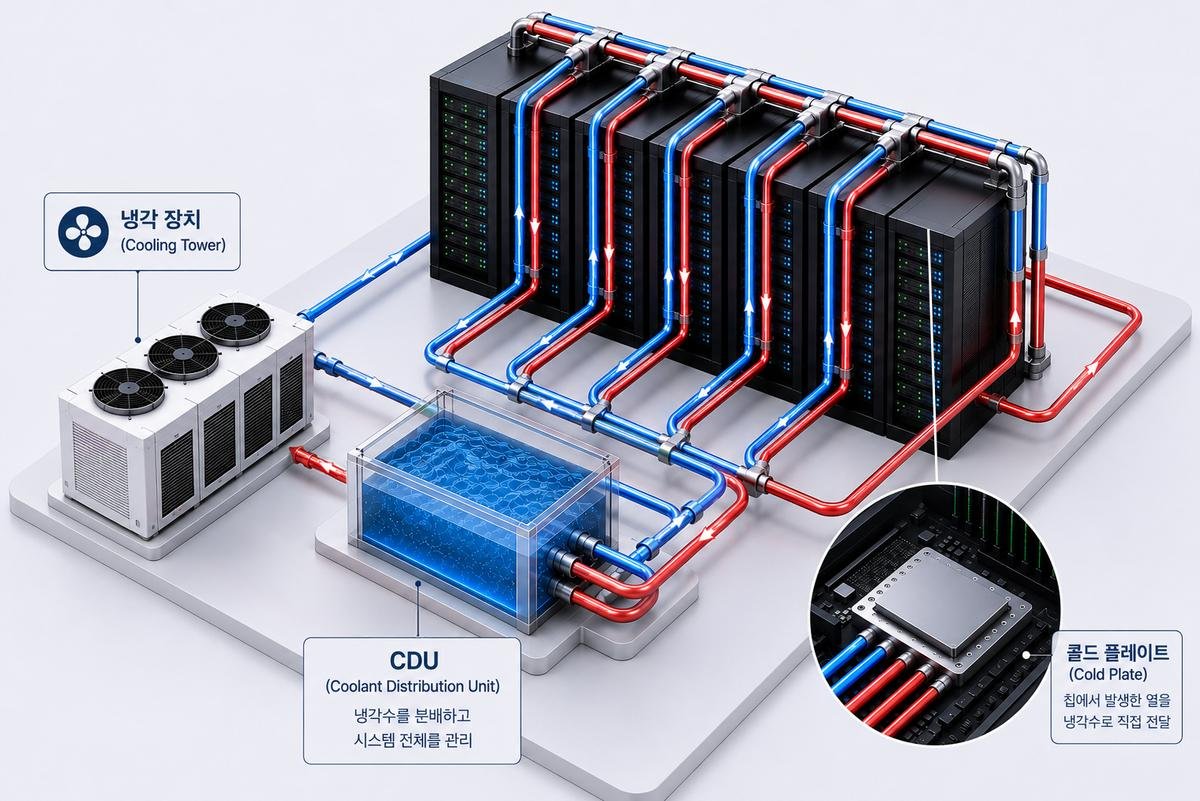
AI training clusters and high-performance computing systems can generate substantial heat within a relatively small rack footprint.
In these environments, conventional air cooling may become difficult to implement efficiently.
Liquid cooling transfers heat using a circulating liquid rather than relying exclusively on air.
Two major approaches are direct-to-chip liquid cooling and immersion cooling.
Direct-to-chip liquid cooling
Direct-to-chip cooling circulates coolant through cold plates attached to heat-generating components, such as CPUs and GPUs.
The system generally includes:
Cold plates.
Coolant distribution manifolds.
Coolant Distribution Units (CDUs).
Pumps and piping.
Heat rejection equipment.
The CDU manages coolant circulation and heat exchange between the technology cooling loop and the facility cooling infrastructure. Depending on its design, it may also provide pressure control, filtration, monitoring, and other functions.
Immersion cooling
Immersion cooling places compatible electronic components or server hardware in a dielectric liquid designed for this application.
Heat is transferred directly from the equipment into the immersion fluid.
Depending on the system architecture, heat is subsequently removed through heat exchangers and facility cooling infrastructure.
Technology | Heat Removal Method | Typical Application |
|---|---|---|
CRAC | Refrigeration-based air cooling | Conventional server rooms |
CRAH | Chilled-water air cooling | Large data centers |
In-row cooling | Localized air cooling | High-density server rows |
Rear door heat exchanger | Rack-level liquid-to-air heat exchange | High-density racks |
Direct-to-chip | Liquid cooling through cold plates | AI and GPU servers |
Immersion cooling | Equipment immersed in dielectric fluid | Specialized HPC and AI environments |
The appropriate technology depends on server compatibility, rack power density, facility infrastructure, operating conditions, and maintenance capabilities.
3. How to Match Cooling Technology to Your Data Center Application
Selecting a cooling system should be based on the facility’s actual operating requirements rather than choosing the most advanced technology available.
The following considerations can help narrow the options.
Data Center Type | Potentially Suitable Cooling Solutions | Main Considerations |
|---|---|---|
Small server room | CRAC | Space, heat load, redundancy |
Enterprise data center | CRAC or CRAH | Central infrastructure and airflow |
Large colocation facility | CRAH and in-row cooling | Variable rack density and scalability |
High-density computing facility | In-row cooling and RDHx | Localized heat removal |
AI GPU data center | Direct-to-chip liquid cooling with supporting air cooling | GPU heat load and coolant infrastructure |
Specialized HPC facility | Direct-to-chip or immersion cooling | Equipment compatibility and heat rejection |
3.1 When Should You Choose CRAC Instead of CRAH?
The decision between CRAC and CRAH depends primarily on the cooling architecture.
Choose a CRAC configuration when:
The facility needs independent DX cooling units.
A centralized chilled-water plant is unavailable.
The cooling load is appropriate for the selected DX equipment.
The required condenser infrastructure can be provided.
Choose a CRAH configuration when:
A central chilled-water plant is available or planned.
The facility has substantial cooling demand.
Centralized plant management is preferred.
The project supports chilled-water distribution infrastructure.
Neither technology is universally more efficient. Actual efficiency depends on equipment selection, operating temperatures, ambient conditions, controls, and the performance of the complete cooling plant.
3.2 When Should You Consider Liquid Cooling?
Liquid cooling becomes increasingly relevant when rack-level thermal loads exceed what can be practically handled by the planned air-cooling architecture.
Before choosing direct-to-chip cooling or immersion cooling, evaluate:
Maximum and average rack power density.
GPU and CPU thermal requirements.
Server manufacturer compatibility.
Required coolant temperature and flow.
Coolant quality and chemistry.
Operating pressure and allowable pressure drop.
Leak detection and isolation strategy.
CDU configuration and redundancy.
Facility heat rejection capacity.
Liquid cooling should be selected as part of an integrated thermal management design rather than treated as an isolated equipment purchase.
4. Evaluate Cooling Capacity, Airflow, and Temperature Control
Even when the correct cooling technology is selected, poor system sizing and airflow management can cause serious operational problems.
4.1 How to Determine the Required Cooling Capacity
A basic cooling capacity estimate can begin with the total heat load.
For a facility with an estimated 500 kW IT load:
If additional facility heat loads are estimated at 40 kW:
This gives a preliminary total thermal load of 540 kW.
The final equipment selection must account for:
Design ambient conditions.
Equipment operating limits.
Sensible and latent heat loads.
Airflow and chilled-water conditions.
Cooling equipment performance at actual operating conditions.
Redundancy and equipment availability.
Planned expansion capacity.
It is important to distinguish between nominal equipment capacity and usable cooling capacity under actual site conditions.
For example, a cooling unit’s rated capacity under standard test conditions may differ from its available capacity at the project’s actual entering-air temperature, outdoor temperature, and water conditions.
4.2 Understand Airflow Distribution
Cooling capacity alone does not guarantee effective heat removal.
Airflow must reach server intakes at the required temperature and volume.
Common airflow problems include:
Hot-air recirculation.
Cold-air bypass.
Blocked floor tiles.
Poor cable management.
Incorrect rack orientation.
Inadequate return-air pathways.
Uneven airflow distribution.
These problems can result in hot spots even when the installed cooling capacity appears sufficient.
Practical improvements include:
Implement hot aisle and cold aisle arrangements.
Install blanking panels in unused rack spaces.
Seal cable openings and unnecessary floor penetrations.
Avoid placing obstructions in front of server intakes.
Evaluate cold aisle or hot aisle containment.
Monitor temperatures at server rack inlets rather than relying only on room-level sensors.
4.3 Consider Temperature and Humidity Requirements
Data center cooling systems must maintain operating conditions within the limits specified by IT equipment manufacturers.
Temperature and humidity control should be evaluated together.
Excessively high temperatures may increase server fan speeds and create thermal stress. Inadequate humidity control can also contribute to electrostatic discharge risks or condensation concerns, depending on operating conditions.
However, maintaining unnecessarily tight temperature and humidity setpoints can increase energy consumption.
The design should use an appropriate environmental operating envelope, with reference to applicable ASHRAE thermal guidelines and the actual server manufacturer’s requirements.
5. Consider Energy Efficiency and Long-Term Operating Costs
The purchase price of a cooling system is only one part of its total cost.
Cooling equipment operates over extended periods, so energy consumption, maintenance requirements, reliability, and equipment lifecycle costs should be considered.
5.1 Understand the Relationship Between Cooling and PUE
Power Usage Effectiveness (PUE) is a widely used metric for evaluating data center energy efficiency.
For example, if a facility consumes 1,000 kW of total electrical power and its IT equipment consumes 700 kW:
Cooling systems contribute to facility energy consumption, alongside UPS losses, lighting, power distribution, and other infrastructure.
Improving cooling efficiency can help reduce PUE, but the result depends on the complete facility design and operating conditions.
5.2 Evaluate Free Cooling and Economizer Opportunities
In suitable climates and system configurations, economizers can reduce mechanical cooling requirements.
Common approaches include:
Air-side economization
Uses suitable outdoor air conditions to provide cooling, either directly or through an appropriate air-handling configuration.
Water-side economization
Uses dry coolers or cooling towers, often with heat exchangers, to provide cooling or reduce chiller operation when outdoor conditions permit.

Before adopting economizer systems, evaluate:
Local climate conditions.
Outdoor air quality.
Water availability.
Humidity and filtration requirements.
Operating temperature limits.
Seasonal operating conditions.
Water treatment and maintenance requirements.
5.3 Compare Total Cost of Ownership
A practical procurement assessment should consider:
Cost Category | What to Evaluate |
|---|---|
Initial investment | Equipment, installation, piping, electrical work |
Energy consumption | Chillers, compressors, pumps, fans |
Maintenance | Filters, coils, pumps, compressors, controls |
Water costs | Water consumption and treatment where applicable |
Reliability | Redundancy, spare parts, serviceability |
Expansion | Additional cooling capacity and infrastructure |
Lifecycle | Expected service life and replacement costs |
A system with a lower purchase price may have higher long-term operating costs.
The best solution is the one that meets the facility’s thermal requirements while providing acceptable lifecycle economics and operational reliability.
6. Evaluate Redundancy, Reliability, and Future Scalability
Data center cooling systems must operate reliably because cooling failures can quickly affect IT equipment.
A cooling architecture should be designed around the facility’s availability requirements.
6.1 Understand Cooling Redundancy Configurations
Common redundancy configurations include:
N: Capacity required to support the design load.
N+1: Required capacity plus one additional redundant unit or capacity module.
2N: Two independent systems, each capable of supporting the required load.
For example, a facility requiring four cooling units to support its design load might use five units in an N+1 arrangement, provided each unit has the required usable capacity.
However, unit redundancy alone does not guarantee system redundancy.
Engineers must also evaluate:
Electrical power supply redundancy.
Chilled-water pump redundancy.
Piping arrangement and isolation.
Control system redundancy.
Cooling tower or dry cooler availability.
CDU and coolant distribution redundancy.
Maintenance procedures and failure isolation.
The appropriate architecture depends on the facility’s availability target and risk assessment.
6.2 Plan for Future AI and High-Density Computing
AI infrastructure can significantly change a data center’s cooling requirements.
A facility initially designed for conventional server racks may later need to accommodate higher-density GPU systems.
Before selecting equipment, consider whether the cooling infrastructure can support:
Higher rack power density.
Additional cooling units.
Liquid-cooled server racks.
Increased chilled-water or coolant flow.
Additional heat rejection capacity.
Modular expansion.
Different operating temperature requirements.
A scalable cooling design can reduce the need for major infrastructure modifications when IT requirements change.
7. What Information Should You Prepare Before Purchasing a Data Center Cooling System?
Before requesting a quotation, buyers should prepare sufficient technical information to allow suppliers and engineering teams to evaluate the application.
The following information is particularly useful.
Required Information | Details to Provide |
|---|---|
Facility location | Country, city, and site conditions |
Facility type | Enterprise, colocation, hyperscale, AI data center |
Total IT load | Current and planned electrical load |
Rack configuration | Number of racks and rack power density |
Cooling requirements | Required capacity and operating conditions |
Cooling architecture | CRAC, CRAH, in-row, RDHx, or liquid cooling |
Water conditions | Supply temperature, return temperature, flow, pressure |
Air conditions | Entering and leaving air temperatures |
Redundancy | N, N+1, or 2N requirements |
Installation | Indoor/outdoor conditions and available space |
Expansion plans | Expected future capacity requirements |
For liquid cooling projects, additional information is necessary:
Server and cold plate specifications.
Coolant type and compatibility requirements.
Required flow rate per rack or cooling loop.
Allowable pressure drop.
CDU heat exchange configuration.
Facility water loop characteristics.
Leak detection and monitoring requirements.
A qualified supplier should review these requirements before recommending a final configuration.
The objective is not simply to select a cooling unit with sufficient nominal capacity. It is to ensure that the equipment can operate reliably within the complete facility’s thermal and hydraulic infrastructure.
Conclusion: Choose a Cooling System Based on Your Facility’s Actual Requirements
There is no single data center cooling system that is suitable for every facility.
CRAC and CRAH systems remain important solutions for conventional data centers, while in-row cooling and rear door heat exchangers offer additional options for higher-density environments. Direct-to-chip and immersion cooling are increasingly relevant for specialized AI and high-performance computing applications.
The correct choice depends on several interconnected factors:
Total IT heat load.
Rack power density.
Airflow and temperature requirements.
Available cooling infrastructure.
Energy efficiency.
Redundancy and reliability.
Maintenance requirements.
Future expansion plans.
A well-designed cooling architecture should balance thermal performance, operational reliability, energy consumption, and long-term investment.
If you are planning a new data center, upgrading existing cooling infrastructure, or developing an AI data center with high-density GPU racks, evaluating these factors before procurement can help prevent costly design mistakes.
Need help selecting the right data center cooling system?
Click here to schedule a technical consultation for your data center cooling project. Contact our team to discuss your cooling capacity, rack density, operating conditions, and equipment requirements, and request a customized cooling solution based on your facility’s needs.
Frequently Asked Questions (FAQs)
1. What is the best cooling system for a data center?
The best cooling system depends on IT load, rack power density, facility infrastructure, and operating requirements.
CRAC and CRAH systems are commonly used in conventional data centers. In-row cooling and rear door heat exchangers can address localized high-density loads, while direct-to-chip and immersion cooling are options for specialized AI and HPC environments.
2. What is the difference between CRAC and CRAH cooling systems?
CRAC systems typically use a direct expansion refrigeration cycle to cool room air.
CRAH systems use chilled water supplied by a central cooling plant and transfer heat through a cooling coil.
The main difference is the cooling architecture: CRAC generally provides local refrigeration, while CRAH depends on centralized chilled-water infrastructure.
3. How do I calculate the cooling capacity required for a data center?
Start by calculating the total IT electrical load and converting it into thermal load.
A basic conversion is:
Then account for additional facility heat loads, environmental conditions, cooling equipment performance, and redundancy requirements.
A final equipment selection should be based on an engineering load assessment rather than IT power alone.
4. Is liquid cooling necessary for AI data centers?
Not every AI data center requires liquid cooling.
The decision depends on GPU thermal requirements, rack power density, server configuration, and the practical limits of the planned air-cooling architecture.
Direct-to-chip liquid cooling is particularly relevant when high-density GPU servers require heat removal directly from processors.
5. What is the difference between direct-to-chip cooling and immersion cooling?
Direct-to-chip cooling uses cold plates attached to heat-generating components, with coolant circulating through the plates.
Immersion cooling places compatible server components or equipment in dielectric fluid.
Both remove heat using liquid, but their equipment requirements, infrastructure, maintenance procedures, and integration methods differ.
6. What information is needed to request a data center cooling system quotation?
A supplier generally needs:
Total IT cooling load.
Rack quantity and power density.
Facility location.
Required cooling architecture.
Air and water operating conditions.
Redundancy requirements.
Installation environment.
Future expansion requirements.
For liquid cooling projects, server specifications, coolant requirements, flow rates, and CDU configuration should also be provided.