Data center cooling systems remove the heat generated by servers, networking equipment, storage devices, and other electrical infrastructure to maintain reliable operating conditions. As IT power density increases, selecting the right cooling technology has become an important engineering decision for data center owners, facility managers, and infrastructure designers.
Different facilities require different cooling approaches. Conventional enterprise data centers may use Computer Room Air Conditioners (CRAC) or Computer Room Air Handlers (CRAH), while facilities with higher rack power densities may require in-row cooling or rear door heat exchangers. AI data centers running high-performance GPU servers are also driving demand for direct-to-chip liquid cooling and immersion cooling technologies.
Understanding the different types of data center cooling systems helps engineering and procurement teams evaluate equipment based on heat load, rack density, energy consumption, operating conditions, and future expansion requirements.
This guide explains the major data center cooling technologies, how they work, their advantages and limitations, and where each solution is most appropriate.
1. Main Categories of Data Center Cooling Systems
Data center cooling technologies can generally be divided into three categories according to how heat is collected, transported, and rejected.
1.1 Air-Based Cooling Systems
Air cooling uses conditioned air to absorb heat from IT equipment and transport it to cooling equipment, where the heat is removed.
Common air-based cooling systems include:
Precision Air Conditioning Systems
Computer Room Air Conditioners (CRAC)
Computer Room Air Handlers (CRAH)
In-Row Cooling Systems
Rear Door Heat Exchangers (RDHx)
Cold Aisle and Hot Aisle Containment Systems
These technologies are widely used in conventional enterprise data centers, colocation facilities, server rooms, and some high-density computing environments.
1.2 Liquid Cooling Systems
Liquid cooling uses circulating fluids to transfer heat away from servers and other heat-generating components.
Major technologies include:
Direct-to-Chip Liquid Cooling
Cold Plate Liquid Cooling
Immersion Cooling
Coolant Distribution Units (CDUs)
Liquid-Cooled Server Racks
Liquid cooling is particularly relevant for high-density AI infrastructure, GPU computing, and high-performance computing environments where removing heat through air alone can become difficult.
1.3 Heat Rejection and Cooling Plant Systems
Air-based and liquid-based cooling systems eventually need to transfer collected heat outside the data center.
Heat rejection equipment includes:
Industrial Chillers
Data Center Chillers
Dry Coolers
Cooling Towers
Heat Exchangers
These systems form part of the overall cooling infrastructure and are often integrated with CRAC, CRAH, or liquid cooling equipment.
The three categories are interconnected. A complete data center thermal management system may combine multiple technologies rather than relying on a single cooling device.
2. Different Types of Data Center Air Cooling Systems
Air cooling remains an important part of data center thermal management. Its effectiveness depends on cooling capacity, airflow distribution, rack layout, and the ability to prevent hot-air recirculation.
2.1 Precision Air Conditioning Systems
Unlike conventional comfort air conditioning, precision cooling equipment is designed around the continuous thermal loads and operating requirements of IT environments.
Typical applications include:
Data centers
Server rooms
Telecommunications facilities
Network operation centers
Critical IT equipment rooms
Precision air conditioning systems may use DX refrigeration or chilled-water configurations, depending on the system design.
Their main functions include:
Removing sensible heat generated by IT equipment.
Maintaining appropriate air temperature.
Managing humidity where required.
Providing continuous cooling operation.
Supporting controlled airflow distribution.
When selecting a precision air conditioner, engineers should evaluate sensible cooling capacity, airflow volume, supply air temperature, redundancy, and operating conditions.
2.2 Computer Room Air Conditioner (CRAC)
A Computer Room Air Conditioner (CRAC) is a precision cooling unit commonly used in data centers and server rooms.
Most conventional CRAC systems use a direct expansion (DX) refrigeration cycle. Refrigerant absorbs heat from the return air through an evaporator coil, and the heat is subsequently rejected through a condenser.
Depending on the design, CRAC systems may use air-cooled or water-cooled condensers.
How CRAC systems work
Hot air returns from the data center.
Air passes through the evaporator coil.
Refrigerant absorbs heat from the air.
The cooled air is supplied back to the room.
The refrigeration system transfers the absorbed heat to the condenser for rejection.
Advantages:
Independent refrigeration-based cooling.
Suitable for many conventional server rooms.
Available in different installation configurations.
Can provide temperature and humidity control.
Limitations:
Requires suitable condenser and heat rejection infrastructure.
Performance depends on ambient and operating conditions.
Room-level cooling may struggle with localized high-density loads.
Compressor operation contributes to energy consumption.
CRAC systems are commonly considered for small and medium-sized data centers where independent precision cooling is preferred.
2.3 Computer Room Air Handler (CRAH)
A Computer Room Air Handler (CRAH) cools data center air using a chilled-water coil rather than an integral DX refrigeration circuit.
The chilled water is supplied by a central cooling plant, typically consisting of chillers, pumps, and associated heat rejection equipment.
How CRAH systems work
Hot return air enters the CRAH unit.
Air passes through the chilled-water cooling coil.
Heat transfers from the air to the circulating chilled water.
Cooled air returns to the data center.
Heated water flows back to the central cooling plant.
Advantages:
Integrates with centralized chilled-water infrastructure.
Suitable for large data center cooling installations.
Allows centralized cooling plant management.
Can support economizer strategies when the overall design and climate conditions permit.
Limitations:
Requires chilled-water piping infrastructure.
Depends on water flow and supply temperature.
Requires hydraulic balancing and water treatment.
Cooling performance is affected by the central plant.
CRAC vs CRAH: What Is the Difference?
Comparison | CRAC | CRAH |
|---|---|---|
Cooling method | Typically DX refrigeration | Chilled-water coil |
Compressor | Usually integrated in DX configuration | Usually located in central chiller plant |
Cooling source | Refrigerant circuit | Central chilled-water system |
Infrastructure | Condenser and refrigerant system | Chillers, pumps, and water piping |
Typical application | Smaller and medium facilities | Larger data centers |
Maintenance focus | Refrigeration components | Coils, valves, pumps, and water systems |
Neither system is automatically more efficient. The better choice depends on facility scale, climate, infrastructure, operating temperatures, and total system design.
2.4 In-Row Cooling Systems

In-row cooling systems are installed directly between or alongside server racks to provide localized heat removal.
Traditional perimeter cooling systems deliver conditioned air from locations around the room. In-row systems position cooling equipment closer to the racks, reducing the distance between the air supply and heat source.
Working principle:
The cooling unit draws in hot air from the server exhaust side.
Heat is transferred through a refrigeration or chilled-water cooling coil.
Conditioned air is delivered toward the server intake side.
Advantages:
Provides localized cooling.
Helps address high-density rack hot spots.
Reduces dependence on long room-level airflow paths.
Supports modular cooling expansion.
Limitations:
Requires careful rack layout planning.
Occupies space within or near server rows.
Requires appropriate piping or refrigeration infrastructure.
Performance depends on airflow management and system configuration.
In-row cooling is often evaluated for colocation facilities, high-density server rooms, and modular data centers.
2.5 Rear Door Heat Exchangers (RDHx)
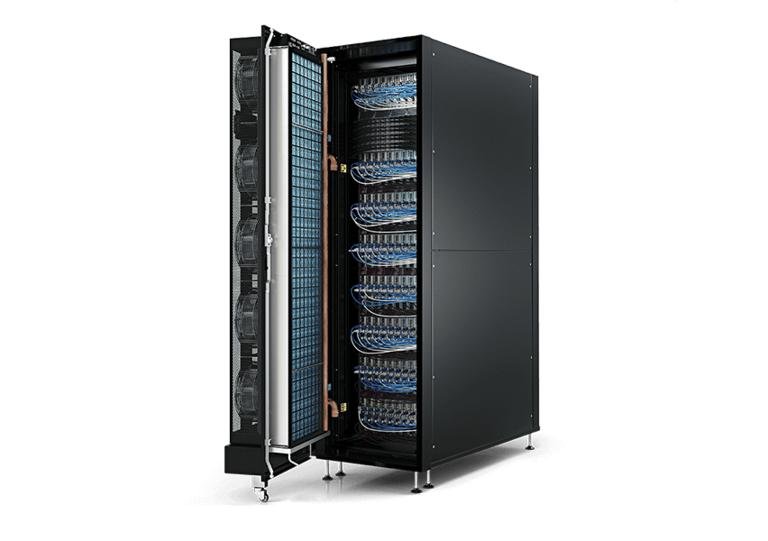
A Rear Door Heat Exchanger (RDHx) is a heat exchanger installed at the rear of a server rack.
It captures heat from the hot exhaust air leaving the servers and transfers that heat into a circulating liquid.
This approach removes heat at the rack level rather than allowing all server exhaust heat to enter the data center room.
Advantages:
Removes heat close to the source.
Can reduce the heat load on room-level cooling systems.
Supports higher-density rack configurations.
Can be integrated into certain existing air-cooled environments.
Limitations:
Requires liquid supply and return connections.
Adds weight and mechanical considerations to server racks.
Requires suitable coolant conditions.
Needs appropriate leak detection and maintenance procedures.
RDHx systems are worth considering when rack-level heat removal is needed but replacing the entire server cooling architecture with direct-to-chip liquid cooling is not practical.
2.6 Cold Aisle and Hot Aisle Containment Systems
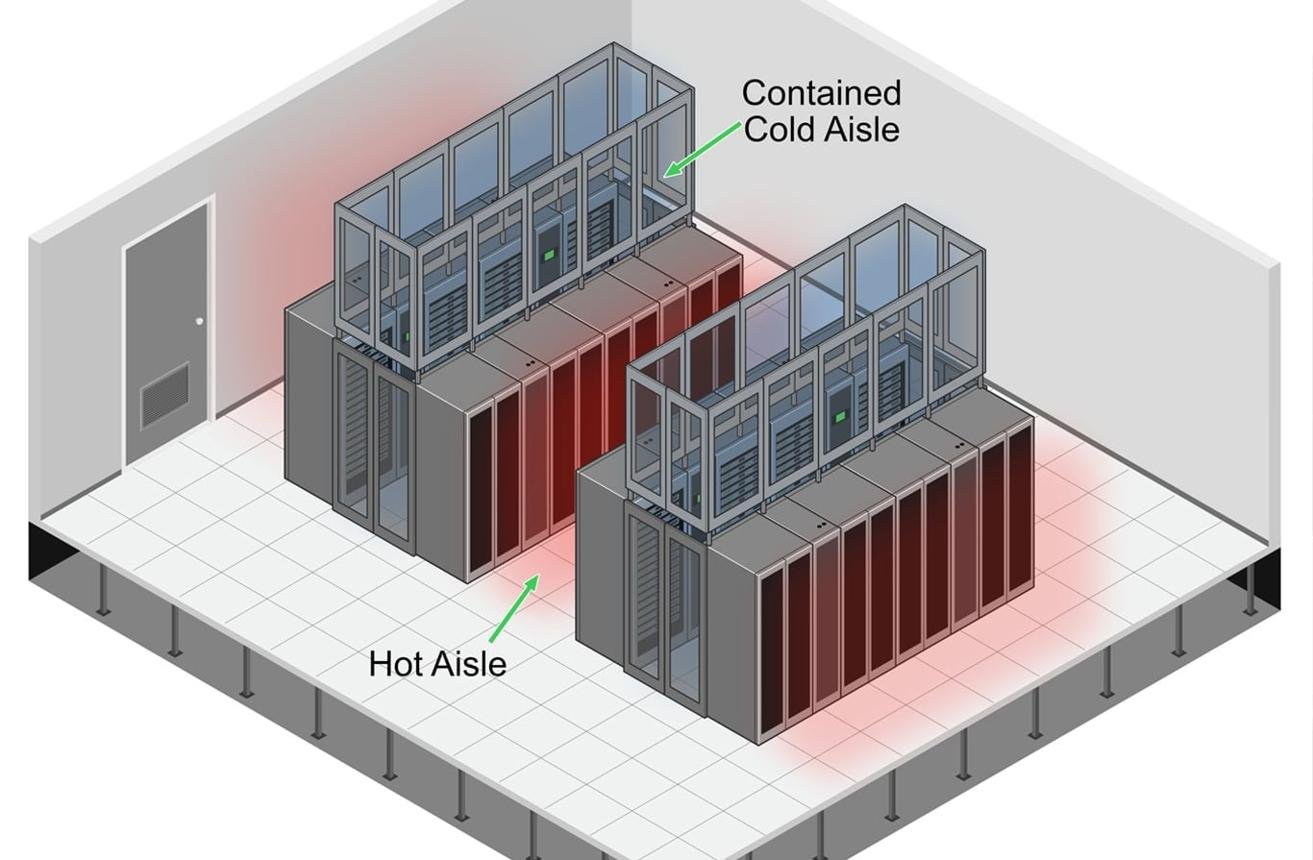
Cold aisle and hot aisle containment systems are airflow management solutions rather than independent refrigeration systems.
They organize server racks so that cold supply air reaches server intakes while hot exhaust air is directed toward cooling unit returns.
Cold aisle containment
The cold aisle is enclosed to prevent cold supply air from mixing with hot exhaust air.
Hot aisle containment
The hot aisle is enclosed to capture hot server exhaust air and direct it toward the cooling return system.
Benefits include:
Reduced hot-air recirculation.
Reduced cold-air bypass.
More predictable airflow distribution.
Improved temperature management.
Potential improvements in cooling system efficiency.
Containment systems are often used together with CRAC, CRAH, and in-row cooling equipment.
Their effectiveness depends on proper sealing, rack configuration, airflow balancing, and cooling system controls.
2.7 Constant Temperature and Humidity Precision Air Conditioners
Constant temperature and humidity precision air conditioners are designed for facilities requiring controlled environmental conditions.
They regulate both air temperature and relative humidity to maintain conditions suitable for sensitive electronic equipment.
Typical applications include:
Data centers with specific environmental control requirements.
Telecommunications equipment rooms.
Laboratory and testing environments.
Electronic manufacturing facilities.
Specialized server rooms.
These systems may use DX or chilled-water configurations.
When selecting this equipment, engineers should evaluate sensible heat ratio, humidity control range, airflow, filtration, operating conditions, and control accuracy.
It is important to distinguish between maintaining a specified humidity range and unnecessarily tight humidity control. The appropriate setpoints should follow IT equipment requirements and applicable environmental guidelines.
3. Different Types of Data Center Liquid Cooling Systems
Liquid cooling is increasingly important in high-density computing environments because liquids can transport substantial amounts of heat through relatively compact distribution systems.
Unlike conventional air cooling, liquid cooling can transfer heat directly from processors, GPUs, or server exhaust air.
However, liquid cooling is not a single technology. Different configurations have different equipment requirements, operating principles, and integration considerations.
3.1 Direct-to-Chip Liquid Cooling
Direct-to-chip liquid cooling removes heat directly from high-temperature electronic components, such as CPUs and GPUs, using liquid-cooled cold plates.
Coolant circulates through channels inside the cold plates, absorbing heat from the components and transporting it to a heat exchanger.
A typical direct-to-chip cooling system includes:
Cold plates.
Coolant distribution manifolds.
Coolant distribution units (CDUs).
Pumps.
Supply and return piping.
Heat exchangers.
Facility cooling infrastructure.
How direct-to-chip cooling works:
Coolant enters the server through a supply manifold.
The coolant flows through cold plates attached to processors.
Heat transfers from the processors into the coolant.
Heated coolant returns through the server’s liquid circuit.
A CDU transfers heat to the facility cooling loop.
The facility cooling infrastructure rejects the collected heat.
Advantages:
Removes heat directly from high-temperature components.
Supports high-density GPU and CPU applications.
Reduces the amount of heat that must be removed through room air cooling.
Can improve thermal management in AI computing environments.
Limitations:
Requires compatible server hardware.
Needs carefully designed coolant distribution.
Introduces hydraulic connections and potential leakage risks.
Requires coolant monitoring and maintenance.
May still require air cooling for memory, power supplies, networking components, and other residual heat sources.
Direct-to-chip cooling is particularly relevant for AI training clusters, GPU server racks, and high-performance computing facilities.
3.2 Cold Plate Liquid Cooling
Cold plate liquid cooling is a common implementation of direct-to-chip cooling.
A cold plate is a heat exchanger mounted directly onto a processor or other heat-generating component.
Its internal channels allow coolant to circulate close to the component’s heat-generating surface.
The cooling performance depends on several factors:
Cold plate thermal resistance.
Coolant flow rate.
Coolant inlet temperature.
Coolant properties.
Internal channel design.
Contact pressure and thermal interface material.
Pressure drop across the cold plate.
Cold plate cooling is particularly useful when specific components generate concentrated thermal loads.
When evaluating a cold plate solution, engineers should confirm compatibility with the server’s mechanical mounting arrangement, processor specifications, coolant chemistry, and hydraulic operating conditions.
3.3 Immersion Cooling Systems
Immersion cooling removes heat by placing compatible electronic equipment directly into a dielectric liquid.
Unlike direct-to-chip cooling, which transfers heat through cold plates, immersion cooling allows the cooling fluid to contact the compatible submerged equipment surfaces.
There are two main approaches.
Single-phase immersion cooling
The dielectric fluid remains in its liquid state during normal operation.
Heat is absorbed by the fluid and transferred through a heat exchanger to another cooling circuit.
Two-phase immersion cooling
The dielectric fluid undergoes a phase change as it absorbs heat, typically evaporating near the heated components.
The vapor then condenses through a heat rejection mechanism and returns to the liquid state.
Advantages:
Direct heat transfer from immersed equipment.
Reduced dependence on conventional server airflow.
Potential suitability for specialized high-density computing.
Different system configurations can support specific HPC applications.
Limitations:
Requires compatible server components and materials.
Fluid selection and management are critical.
Maintenance procedures differ from conventional server environments.
Equipment handling and servicing require specialized procedures.
Fluid compatibility, environmental requirements, and lifecycle costs must be evaluated.
Immersion cooling should be considered when the complete server architecture, maintenance model, and facility infrastructure are compatible with this technology.
3.4 Coolant Distribution Units (CDUs)
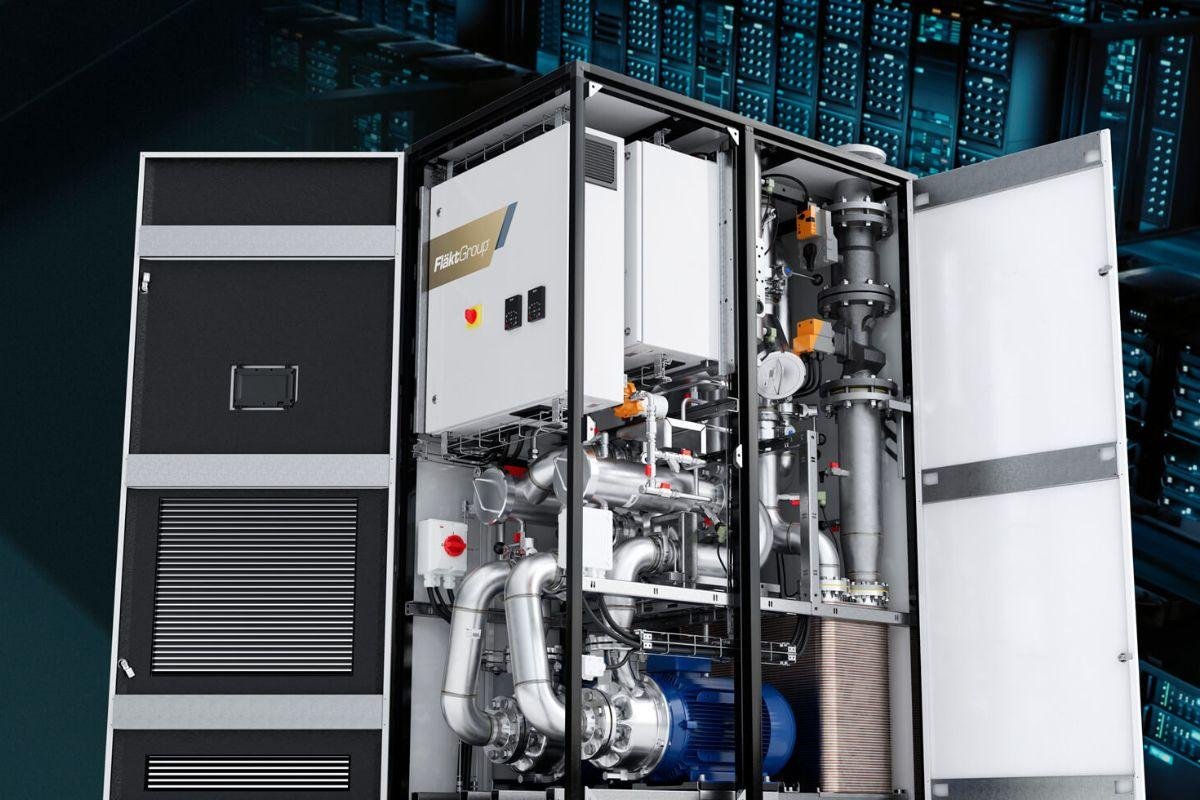
A Coolant Distribution Unit (CDU) is an important component of many liquid-cooled data center architectures.
Its primary function is to circulate and manage coolant within the technology cooling system while transferring heat to the facility cooling infrastructure.
Depending on the design, a CDU may include:
Circulation pumps.
Plate heat exchangers.
Temperature sensors.
Pressure sensors.
Flow monitoring.
Filtration.
Control valves.
Leak detection interfaces.
Monitoring and control systems.
Primary CDU Configurations
CDUs are available in different configurations depending on cooling architecture and project requirements.
Liquid-to-liquid CDU
Uses a heat exchanger to transfer heat between the technology cooling loop and facility water loop without directly mixing the two fluids.
Liquid-to-air CDU
Uses an air-cooled heat rejection arrangement for certain applications where the facility architecture supports it.
The actual CDU configuration should be selected based on required cooling capacity, coolant compatibility, supply temperature, flow rate, pressure requirements, and redundancy.
What Should Engineers Check Before Selecting a CDU?
Parameter | Why It Matters |
|---|---|
Cooling capacity | Must accommodate the connected thermal load |
Coolant flow rate | Determines heat transport capability |
Supply temperature | Affects component cooling conditions |
Operating pressure | Must match the connected hydraulic system |
Pressure drop | Influences pump selection and system performance |
Heat exchanger design | Determines heat transfer characteristics |
Redundancy | Supports availability requirements |
Monitoring | Helps identify abnormal operating conditions |
A CDU should not be selected based on cooling capacity alone. Its hydraulic performance and compatibility with both cooling loops are equally important.
3.5 Liquid-Cooled Server Racks
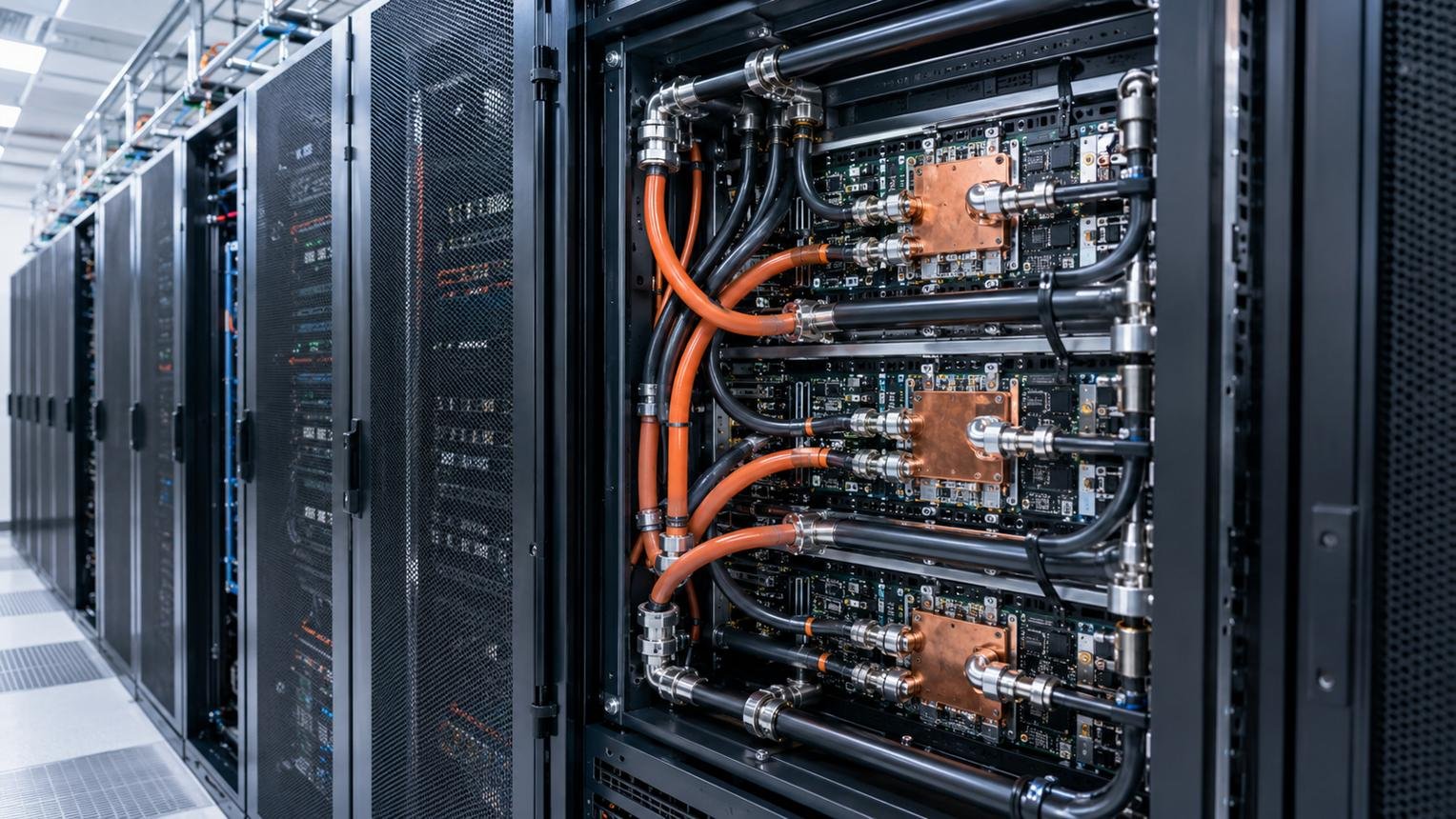
A liquid-cooled server rack integrates liquid distribution infrastructure with compatible server equipment.
Depending on the design, a rack may include manifolds, quick-disconnect fittings, coolant supply and return connections, and monitoring components.
Liquid-cooled racks are particularly relevant for AI computing facilities where multiple GPU servers operate within a compact rack footprint.
Important design considerations include:
Total rack thermal load.
Coolant flow requirements.
Manifold sizing.
Hydraulic pressure drop.
Connection compatibility.
Leak detection.
Rack maintenance access.
Integration with CDUs.
Facility cooling loop capacity.
A liquid-cooled rack must be designed as part of the complete cooling architecture rather than treated as an independent server enclosure.
4. Data Center Heat Rejection and Cooling Infrastructure
Regardless of whether a facility uses air cooling or liquid cooling, collected heat must ultimately be rejected to the surrounding environment.
Heat rejection equipment is therefore an essential part of the overall data center cooling system.
4.1 Data Center Chillers

A data center chiller removes heat from circulating water or another specified cooling fluid.
The chilled fluid is distributed to CRAH units, cooling coils, CDUs, or other heat exchange equipment.
Two common configurations are:
Air-cooled chillers
Reject heat directly to outdoor air through refrigerant-to-air heat exchangers.
They generally avoid the need for cooling towers and associated condenser-water systems.
Water-cooled chillers
Reject heat through a condenser-water circuit, typically connected to cooling towers or another heat rejection arrangement.
Water-cooled configurations require additional infrastructure, including condenser-water pumps and water treatment systems where applicable.
Comparison | Air-Cooled Chiller | Water-Cooled Chiller |
|---|---|---|
Heat rejection | Outdoor air | Condenser-water circuit |
Cooling tower | Generally not required | Commonly required |
Water consumption | Generally lower at the plant | Depends on cooling tower operation |
Installation | Often simpler | More infrastructure required |
Maintenance | Air-side coils and refrigeration system | Chiller, condenser-water system, and tower |
Site requirements | Outdoor airflow and clearance | Plant space and water infrastructure |
The selection depends on climate, available space, water availability, energy costs, operating conditions, and lifecycle economics.
4.2 Dry Coolers

A dry cooler is an air-cooled heat exchanger that transfers heat from circulating liquid to outdoor air.
It typically uses fans to move air across finned heat exchanger coils.
Dry coolers are commonly integrated into:
Data center chilled-water systems.
Liquid cooling infrastructure.
CDU facility water loops.
Free cooling systems.
Industrial cooling applications.
Advantages:
Does not require evaporative cooling water during normal dry operation.
Can reduce dependence on mechanical chillers under suitable conditions.
Relatively straightforward heat rejection principle.
Can be integrated into different cooling plant configurations.
Limitations:
Performance depends strongly on outdoor dry-bulb temperature.
Large heat exchanger surface areas may be required.
Fan energy consumption must be considered.
May not provide sufficiently low fluid temperatures during hot weather without additional cooling.
Dry coolers are particularly worth evaluating in projects where water conservation and economizer operation are important.
4.3 Cooling Towers
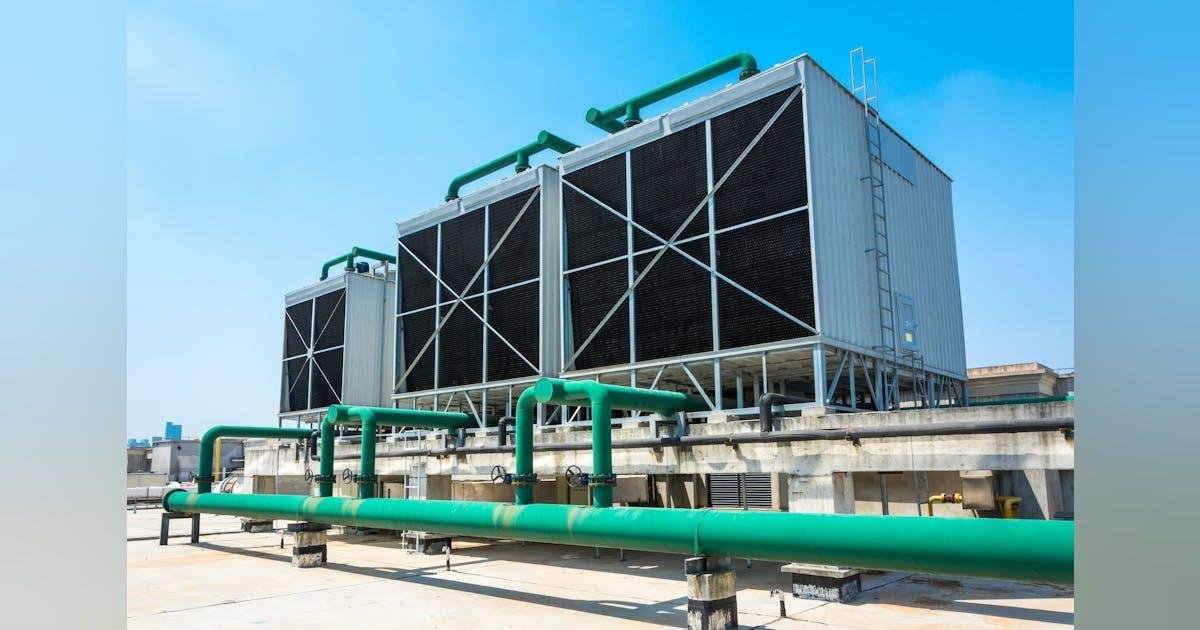
Cooling towers reject heat through evaporative cooling.
Warm condenser water is distributed inside the tower, where it comes into contact with moving air. A portion of the water evaporates, removing heat from the remaining water.
The cooled water returns to the chiller condenser circuit.
Cooling towers are commonly used with water-cooled chillers in large data center cooling plants.
Advantages:
Effective heat rejection under suitable environmental conditions.
Supports water-cooled chiller configurations.
Can contribute to lower plant energy consumption in appropriate designs.
Limitations:
Consumes water through evaporation and blowdown.
Requires water treatment.
Needs regular cleaning and maintenance.
Can be affected by water quality and environmental conditions.
Before selecting a cooling tower, engineers should evaluate wet-bulb temperature, water availability, water treatment requirements, operating noise, and local environmental regulations.
5. Comparison of Different Data Center Cooling Technologies
Choosing the right cooling solution requires understanding the differences between equipment types, their applications, and their limitations.
The following table provides a practical overview.
Cooling Technology | Main Cooling Method | Typical Application |
|---|---|---|
Precision Air Conditioning | Controlled air cooling | Server rooms and data centers |
CRAC | DX refrigeration | Conventional data centers |
CRAH | Chilled-water air cooling | Large data centers |
In-Row Cooling | Localized air cooling | High-density server rows |
Rear Door Heat Exchanger | Rack-level liquid-to-air heat exchange | High-density racks |
Cold Aisle Containment | Airflow separation | Air-cooled facilities |
Direct-to-Chip Cooling | Cold plates and circulating coolant | AI and GPU servers |
Immersion Cooling | Dielectric fluid immersion | Specialized HPC facilities |
CDU | Coolant circulation and heat exchange | Liquid-cooled data centers |
Chiller | Refrigeration-based heat removal | Central cooling plants |
Dry Cooler | Air-cooled liquid heat rejection | Cooling plant and liquid loops |
Cooling Tower | Evaporative heat rejection | Water-cooled chiller plants |
Air Cooling vs. Liquid Cooling: Which Is Better?
Neither air cooling nor liquid cooling is universally superior.
Their suitability depends on heat density, server design, operating conditions, and infrastructure requirements.
Factor | Air Cooling | Liquid Cooling |
|---|---|---|
Heat transfer medium | Air | Liquid |
Heat collection | Server airflow | Cold plates, dielectric fluid, or heat exchangers |
Typical equipment | CRAC, CRAH, in-row units | Cold plates, CDUs, immersion tanks |
High-density suitability | Depends on airflow and system design | Often advantageous for high component heat loads |
Infrastructure | Air distribution and cooling plant | Coolant distribution and heat rejection |
Maintenance | Filters, coils, fans, refrigeration components | Pumps, filters, coolant, connections, heat exchangers |
Main operational concern | Airflow and temperature distribution | Coolant compatibility, flow, pressure, and leakage |
Many modern facilities use hybrid cooling architectures.
For example, a GPU data center may use direct-to-chip liquid cooling for processors while retaining air cooling for memory, networking equipment, power supplies, and other components.
6. How to Choose the Right Data Center Cooling System
Selecting cooling equipment should begin with the facility’s actual engineering requirements rather than the equipment manufacturer’s nominal capacity or the latest cooling technology trend.
The following factors should be evaluated before making a purchasing decision.
6.1 Calculate Total Heat Load and Rack Power Density
The first step is to estimate the total thermal load.
A simplified conversion is:
Where:
\(Q\) = thermal load in BTU/h.
\(P\) = electrical power in kW.
For example, a data center with a 300 kW IT load has an approximate IT heat load of:
This calculation provides a starting point, not a final equipment selection.
Additional facility heat loads, design ambient conditions, sensible cooling capacity, and equipment operating conditions must also be considered.
Rack power density is equally important because cooling requirements are not necessarily distributed evenly throughout the facility.
6.2 Evaluate the Facility’s Existing Infrastructure
Before selecting new cooling equipment, determine what infrastructure is already available.
Check:
Existing chilled-water systems.
Electrical supply capacity.
Outdoor installation space.
Condenser-water infrastructure.
Water availability.
Existing piping arrangements.
Available ceiling or raised-floor space.
Cooling equipment access and maintenance clearance.
For retrofit projects, compatibility with existing infrastructure can significantly affect the practical choice of cooling technology.
6.3 Consider Energy Efficiency and PUE
Power Usage Effectiveness (PUE) measures the relationship between total facility energy consumption and IT equipment energy consumption.
Cooling equipment contributes to facility energy consumption through compressors, fans, pumps, and other auxiliary equipment.
When comparing cooling solutions, evaluate the complete system rather than comparing individual unit efficiency figures alone.
Important considerations include:
Part-load performance.
Chiller efficiency.
Fan and pump energy.
Supply air and water temperatures.
Economizer opportunities.
Control strategies.
Seasonal operating conditions.
6.4 Evaluate Reliability and Redundancy
Cooling failures can lead to server overheating and operational disruption.
Depending on the facility’s availability requirements, engineers may consider N, N+1, or 2N cooling configurations.
However, redundancy must cover the complete system, including power supplies, pumps, piping, controls, and heat rejection equipment.
A system with redundant CRAC units but a single vulnerable chilled-water pump may still have a significant availability risk.
6.5 Plan for Future Expansion
A cooling system should accommodate foreseeable changes in IT infrastructure.
Consider:
Additional server racks.
Higher GPU power density.
Liquid-cooled server deployment.
Increased facility cooling load.
Additional CDUs or cooling modules.
Expansion of chilled-water distribution.
Future heat rejection capacity.
Modular equipment and appropriately designed infrastructure can make future expansion easier.
6.6 Evaluate Suppliers and Equipment Specifications
Before purchasing, review more than the advertised cooling capacity.
A professional equipment evaluation should include:
Evaluation Area | What to Verify |
|---|---|
Cooling capacity | Rated and available capacity under project conditions |
Performance | Sensible capacity, airflow, and operating range |
Electrical | Voltage, frequency, power consumption |
Mechanical | Dimensions, weight, connection requirements |
Controls | Monitoring, alarms, and control interfaces |
Reliability | Redundancy and serviceability |
Quality | Documented manufacturing and quality-control processes |
Compliance | Applicable project standards and certifications |
Warranty | Coverage, duration, and exclusions |
Support | Spare parts and after-sales arrangements |
For liquid cooling equipment, also verify coolant compatibility, flow rate, pressure drop, heat exchanger performance, and leakage management.
7. Common Mistakes When Selecting Data Center Cooling Systems
Even technically capable buyers can make costly mistakes when evaluating cooling equipment.
Mistake 1: Selecting Equipment Based Only on Total IT Load
A facility may have sufficient overall cooling capacity but still experience hot spots because of uneven rack power density.
Better approach: Evaluate cooling capacity at both facility and rack levels.
Mistake 2: Assuming CRAC and CRAH Are Interchangeable
CRAC and CRAH systems use different cooling architectures and require different infrastructure.
Better approach: Confirm whether the project uses DX refrigeration or a central chilled-water system before selecting equipment.
Mistake 3: Ignoring Airflow Management
Increasing the number of cooling units does not necessarily solve hot-air recirculation or cold-air bypass.
Better approach: Assess rack arrangement, containment, supply air paths, and return air paths.
Mistake 4: Choosing Liquid Cooling Without Checking Compatibility
Not every server is designed for the same coolant, pressure, connection, or operating temperature.
Better approach: Confirm server manufacturer requirements and the complete hydraulic design before purchasing CDUs or liquid cooling equipment.
Mistake 5: Comparing Equipment Only by Purchase Price
Low initial equipment cost does not necessarily mean low operating cost.
Better approach: Compare energy consumption, maintenance, reliability, installation, and lifecycle costs.
Mistake 6: Ignoring Future AI Infrastructure Requirements
A cooling system designed for conventional IT loads may not accommodate future GPU deployment.
Better approach: Evaluate future rack power density and whether the cooling architecture can support hybrid air and liquid cooling.
Conclusion: Selecting the Right Cooling Technology for Long-Term Data Center Performance
Data center cooling systems include a wide range of technologies, from conventional precision air conditioning to advanced liquid cooling and centralized heat rejection equipment.
CRAC and CRAH systems remain important for conventional data center environments. In-row cooling, rear door heat exchangers, and containment systems provide additional options for managing localized heat loads and improving airflow. Direct-to-chip and immersion cooling address different requirements in high-density AI and HPC infrastructure.
The right solution depends on the complete facility design, including IT heat load, rack power density, environmental conditions, cooling infrastructure, energy efficiency, reliability, and future expansion plans.
In many projects, combining multiple technologies provides a more practical solution than relying on one cooling method.