Data center thermal management is the process of controlling, transferring, and removing heat generated by servers, networking equipment, power systems, and other infrastructure. Its purpose is not simply to keep the room cool. It is to maintain suitable operating conditions at IT equipment inlets, prevent localized overheating, manage heat rejection, and ensure that cooling infrastructure operates reliably.
As server performance and rack power density increase, thermal management becomes more demanding. Traditional room-based air conditioning may be sufficient for some facilities, but high-density GPU servers and AI computing infrastructure can create concentrated heat loads that require in-row cooling, rear door heat exchangers, direct-to-chip liquid cooling, or hybrid architectures.
A well-designed data center thermal management system must therefore coordinate several elements: IT heat load, airflow distribution, cooling equipment, fluid circulation, heat rejection, environmental control, monitoring, and redundancy.
This guide explains the main technologies, engineering considerations, system configurations, and operational practices that data center owners, facility managers, HVAC engineers, MEP consultants, and procurement teams should understand.
1. What Is Data Center Thermal Management and Why Does It Matter?
Thermal management involves controlling the movement of heat from IT equipment to the external environment.
Every operating server generates heat as electrical energy is consumed. That heat must be removed continuously to prevent equipment from operating outside its specified environmental limits.
The thermal management process generally includes four stages:
Heat generation: CPUs, GPUs, memory, storage, networking equipment, and power components generate heat during operation.
Heat capture: Air or liquid cooling systems collect heat from the equipment.
Heat transport: Fans, pumps, ducts, pipes, and cooling circuits move the heat toward the cooling plant.
Heat rejection: Chillers, dry coolers, cooling towers, or other heat rejection equipment transfer the heat to the external environment.
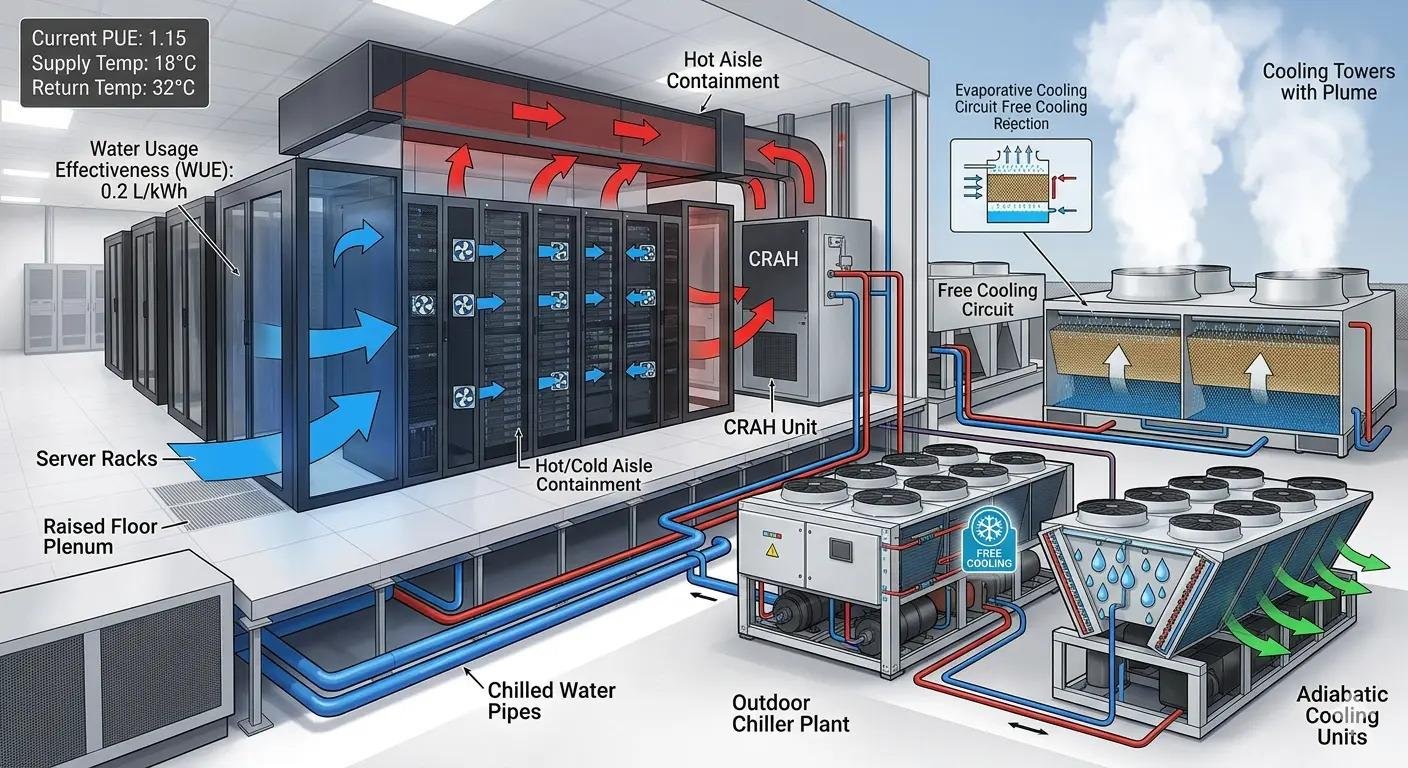
A weakness at any stage can affect the performance of the entire system.
For example, a facility may have enough installed cooling capacity but still experience server overheating because cold air does not reach the rack intakes evenly. Similarly, a liquid cooling system may have adequate nominal capacity but fail to deliver the required thermal performance because of insufficient coolant flow or poor heat exchanger selection.
Main objectives of thermal management
A properly designed system should address several operational requirements:
Maintain IT equipment within its specified inlet temperature and humidity conditions.
Prevent hot spots and uneven temperature distribution.
Remove heat reliably under changing IT workloads.
Support current and planned rack power densities.
Minimize unnecessary fan, pump, and compressor energy.
Maintain cooling availability during equipment failures or maintenance.
Provide practical access for inspection, repair, and expansion.
Support safe integration of air and liquid cooling technologies.
Thermal management is therefore a facility-wide engineering discipline, not simply an HVAC equipment selection exercise.
2. Understand Data Center Heat Loads and Cooling Design Requirements
Before selecting cooling equipment, engineers need to understand how much heat the facility must remove and where that heat is generated.
Choosing equipment based only on total room area or the nominal capacity of existing air conditioners can lead to poor performance.
Calculate the IT heat load
For many data center applications, nearly all electrical power consumed by IT equipment ultimately becomes heat that must be removed from the facility.
A practical starting point is:
Where:
\(Q_{\text{IT}}\) = IT equipment heat load.
\(P_{\text{IT}}\) = electrical power consumed by IT equipment.
If IT equipment consumes 500 kW of electrical power, approximately 500 kW of heat must ultimately be removed, subject to the system boundary and any energy leaving through other mechanisms.
The complete facility heat load may also include UPS losses, power distribution equipment, lighting, occupants, and other sources.
These loads should be assessed separately rather than assuming that IT load represents the entire cooling requirement.
Distinguish between total and sensible cooling capacity
Cooling equipment specifications may include both total cooling capacity and sensible cooling capacity.
Total cooling capacity includes the heat removed through both sensible cooling and latent cooling.
Sensible cooling capacity refers to heat removal that changes air temperature without accounting for moisture removal.
This distinction matters because data centers generally have substantial sensible heat loads. A unit with sufficient total cooling capacity may still be unsuitable if its sensible capacity is insufficient under the actual operating conditions.
Engineers should also check the rated conditions behind the manufacturer’s performance data. Cooling capacity can change with entering air temperature, humidity, chilled-water temperature, airflow, and other operating parameters.
Evaluate rack-level heat distribution
Total facility load does not reveal how heat is distributed between racks.
Two data centers with similar total IT power can have very different thermal management requirements if one has evenly distributed loads and the other contains a small number of high-density GPU racks.
Collect information such as:
Total IT electrical load.
Power consumption by rack.
Server configuration and workload.
Rack dimensions and equipment arrangement.
Expected future rack density.
Equipment inlet temperature requirements.
Existing cooling unit locations and capacity.
This information helps determine whether room-based cooling is sufficient or whether localized cooling is necessary.
Consider future expansion
Cooling systems should account for planned IT expansion, not just the initial deployment.
However, excessive oversizing can also create problems. Equipment operating far below its intended load may experience inefficient part-load operation, unnecessary cycling, or poor control performance.
The design should balance current demand, realistic growth plans, redundancy requirements, and equipment operating ranges.
3. Main Data Center Thermal Management Technologies
Different cooling technologies remove heat in different ways. The appropriate choice depends on heat density, IT hardware compatibility, existing infrastructure, climate, and operating requirements.
3.1 Precision air conditioning: CRAC and CRAH
Precision air conditioning is widely used in traditional enterprise data centers, server rooms, and facilities where air cooling remains suitable.
Two common equipment types are CRAC and CRAH.
Feature | CRAC | CRAH |
|---|---|---|
Full name | Computer Room Air Conditioner | Computer Room Air Handler |
Typical cooling method | Direct expansion (DX) | Chilled-water cooling coil |
Heat removal | Refrigerant circuit and condenser | Chilled-water circuit |
Main components | Compressor, evaporator, condenser | Fan, cooling coil, control valves |
Typical application | Distributed or smaller cooling systems | Facilities with centralized chilled-water infrastructure |
CRAC units use a refrigeration cycle to cool air directly. CRAH units typically receive chilled water from a central cooling plant and transfer heat from room air into the water circuit.
Both can be effective when airflow, equipment capacity, and control settings are properly engineered.
Selection should consider sensible capacity, airflow, entering conditions, electrical consumption, redundancy, maintenance access, and compatibility with the existing cooling plant.
3.2 In-row cooling systems
In-row cooling places cooling units between or alongside server racks.
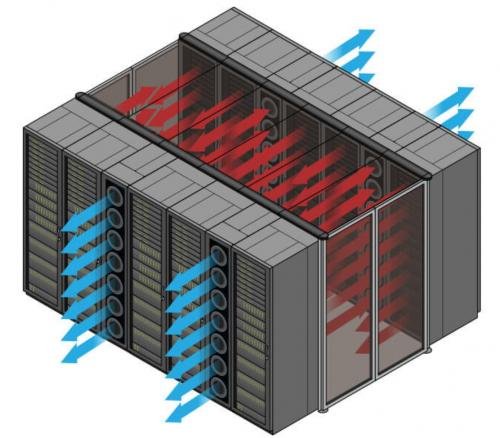
Unlike traditional room-based cooling, which distributes conditioned air across a larger space, in-row cooling brings cooling closer to the heat source.
Potential advantages include:
Shorter air distribution paths.
More localized temperature control.
Improved support for concentrated rack loads.
Flexible deployment in selected high-density areas.
In-row systems still require careful airflow planning. Engineers must evaluate supply and return air paths, fan capacity, rack arrangement, maintenance access, and the interaction between units.
They are not automatically more efficient than room-based systems in every facility.
3.3 Rear door heat exchangers
A rear door heat exchanger captures heat from server exhaust air at the back of the rack.
The heat exchanger transfers heat from the exhaust air into a circulating liquid. This reduces the amount of heat released into the data center room.
Depending on the configuration, rear door heat exchangers can be passive or actively assisted.
They can be useful when:
Rack heat loads are concentrated.
Existing room cooling is approaching its practical limits.
Operators want to remove heat close to the rack.
A liquid distribution system is available or can be integrated.
Important design considerations include water temperature, flow rate, pressure drop, heat exchanger capacity, connection arrangements, and leak management.
Rear door heat exchangers are not the same as direct-to-chip cooling. They remove heat from rack exhaust air rather than transferring heat directly from selected server components.
3.4 Direct-to-chip liquid cooling
Direct-to-chip liquid cooling uses cold plates attached to high-heat components, commonly CPUs and GPUs.
Coolant circulates through the cold plates, absorbs heat, and transfers it to a liquid cooling loop.
This approach captures heat closer to its source and reduces the amount that must be removed through server airflow.
Potential benefits include:
More direct heat removal from high-power components.
Support for high-density GPU and HPC applications.
Reduced thermal burden on room-based air cooling.
Opportunities to optimize facility cooling temperatures, depending on the design.
However, not every server component is necessarily liquid-cooled. Memory, storage, power supplies, and other components may still release heat into the surrounding air.
A facility using direct-to-chip cooling may therefore still need CRAC or CRAH systems for residual heat and general room environmental control.
3.5 Immersion cooling
Immersion cooling places compatible IT hardware in a dielectric fluid.
There are two principal configurations:
Single-phase immersion: The dielectric fluid absorbs heat while remaining liquid.
Two-phase immersion: The fluid changes phase as it absorbs heat and subsequently condenses.
Immersion cooling can support specialized high-density computing environments, but it requires compatible hardware, fluid management, appropriate service procedures, and a suitable heat rejection arrangement.
It should be evaluated as a complete infrastructure solution rather than simply an alternative server enclosure.
Comparing the main cooling technologies
Technology | Heat capture location | Suitable applications | Main considerations |
|---|---|---|---|
CRAC/CRAH | Room air | Traditional server rooms and data centers | Airflow, sensible capacity, and cooling plant |
In-row cooling | Near server racks | Localized or concentrated rack loads | Layout, airflow, and equipment integration |
Rear door heat exchanger | Rack exhaust air | Racks with concentrated heat output | Water conditions and rack compatibility |
Direct-to-chip | Selected server components | GPU, AI, and high-performance computing | Server compatibility, coolant flow, and CDU |
Immersion cooling | Hardware immersed in dielectric fluid | Specialized high-density computing | Fluid management and service procedures |
No single technology is suitable for every facility. Some data centers benefit from optimized air cooling, while others require liquid cooling or a combination of several methods.
4. Design an Integrated Thermal Management System
Selecting individual cooling products is only part of the engineering process. A complete data center thermal management system must coordinate heat capture, distribution, circulation, and rejection.
Airflow architecture and containment
For air-cooled facilities, engineers should establish clear supply and return airflow paths.
A typical design includes:
Cold air supplied to server inlets.
Servers drawing air through their components.
Hot exhaust air discharged toward the return path.
Cooling equipment removing heat from the return air.
Hot aisle and cold aisle containment can help prevent mixing between supply and exhaust air.
The design should also account for raised-floor openings, overhead ducts, cable penetrations, blanking panels, rack placement, and maintenance access.
Liquid cooling distribution and CDUs
In many liquid-cooled data centers, a Coolant Distribution Unit (CDU) manages the interface between the facility cooling circuit and the technology cooling circuit.
Depending on the architecture, the CDU may provide:
Heat exchange between separate fluid loops.
Coolant circulation.
Flow and pressure control.
Temperature monitoring.
Filtration.
Alarm and leak detection functions.
Not all CDUs have identical configurations. Some use liquid-to-liquid heat exchangers, while other designs have different heat transfer and circulation arrangements.
Engineers should confirm:
Required coolant type and compatibility.
Supply and return temperature conditions.
Required flow rate.
Available pressure and allowable pressure drop.
Heat exchanger capacity.
Pump configuration and redundancy.
Filtration requirements.
Monitoring and control interfaces.
Heat rejection infrastructure
Heat captured by air or liquid cooling systems must ultimately be rejected outside the facility.
Common heat rejection equipment includes:
Data center chillers.
Dry coolers.
Cooling towers.
Heat exchangers.
Condenser systems.
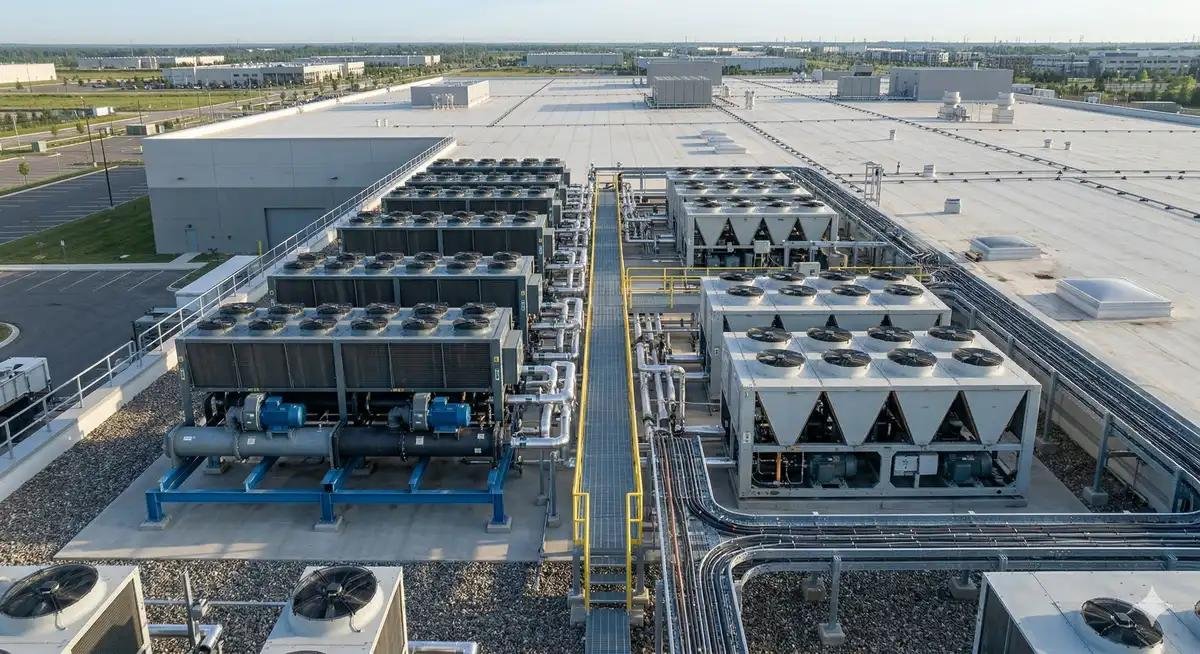
A chiller produces chilled water for cooling equipment. A dry cooler rejects heat through an air-cooled heat exchanger. A cooling tower uses evaporative heat rejection.
The correct arrangement depends on outdoor conditions, required water temperatures, water availability, energy costs, redundancy, and facility design.
Plan redundancy and maintainability
Cooling equipment failures can affect server operating conditions quickly, particularly in high-density environments.
The design should consider:
Cooling unit redundancy.
Pump and fan redundancy.
Chiller and heat rejection availability.
Isolation valves and maintenance access.
Backup power requirements.
Alarm and failure response.
Maintenance without unnecessary service disruption.
Redundancy should be assessed at the system level. Having multiple cooling units does not guarantee resilience if they share a vulnerable power source, pipe connection, control system, or heat rejection component.
5. Best Practices for Data Center Thermal Management
A technically sound design must be supported by effective commissioning, monitoring, and maintenance.
The following practices help operators maintain stable thermal conditions and identify problems before they become critical.
Monitor rack inlet temperatures
Room-average temperature measurements can conceal localized overheating.
Measure temperatures at representative rack inlets, including areas with high-density equipment and different airflow conditions.
Monitoring should help identify:
Rack-to-rack temperature differences.
Localized hot spots.
Hot air recirculation.
Changes caused by server workload.
Cooling performance degradation.
Sensor placement matters. A small number of poorly located sensors may not represent actual IT operating conditions.
Maintain appropriate airflow
For air-cooled facilities:
Install blanking panels in unused rack spaces.
Seal unnecessary cable and floor openings.
Keep supply and return paths unobstructed.
Maintain containment doors and panels.
Review perforated tile placement and airflow distribution.
Avoid increasing fan speeds before investigating the underlying airflow problem.
These measures help cooling equipment deliver air where it is needed.
Control temperature and humidity appropriately
The target operating conditions should follow the requirements of the installed IT equipment and the facility’s engineering design.
Avoid excessively low temperature settings. Overcooling can increase energy consumption without providing meaningful protection.
Humidity control also requires attention. Excessive humidity can create moisture-related risks, while very low humidity may increase electrostatic discharge concerns.
For liquid cooling systems, condensation prevention is particularly important. Coolant temperatures, room dew point, insulation, and environmental conditions must be considered together.
Monitor liquid cooling system conditions
Liquid cooling introduces additional parameters that require continuous or periodic monitoring.
Important checks include:
Coolant supply and return temperatures.
Flow rate and pressure.
Fluid quality and chemistry.
Filter condition.
Pump operation.
Connector integrity.
Leak detection alarms.
Signs of corrosion or contamination.
For systems using water-based coolant, water quality and material compatibility should follow the equipment and system requirements.
Maintenance procedures should define how to isolate circuits, handle connectors, respond to leaks, and restore normal operation.
Commission the complete system
Commissioning should verify that installed equipment performs as intended under the project’s design conditions.
Relevant checks include:
Confirming equipment installation and connection details.
Verifying airflow and water flow.
Checking temperature and pressure sensor readings.
Testing control sequences and alarms.
Confirming equipment staging and redundancy behavior.
Reviewing failure and recovery procedures.
Documenting baseline operating conditions.
Where practical, performance should be checked under different operating loads rather than only during initial startup.
6. Improve Thermal Management Efficiency and Reduce Operating Costs
Thermal management must balance cooling performance with energy consumption.
An oversized cooling system, poor airflow, or inefficient heat rejection arrangement can increase operating costs even when temperatures remain within acceptable limits.
Optimize cooling equipment operation
For CRAC and CRAH systems, consider:
Variable-speed fan control.
Appropriate supply air temperature settings.
Coordinated operation between cooling units.
Filter and coil maintenance.
Correct airflow distribution.
For chilled-water systems, review:
Chiller staging.
Chilled-water supply temperature.
Pump speed and flow.
Heat exchanger performance.
Condenser-side operating conditions.
Any adjustment must remain within equipment operating limits and the IT environmental requirements.
Evaluate free cooling and economization
Free cooling uses suitable outdoor conditions to reduce the need for mechanical refrigeration.
Air-side economization introduces filtered outdoor air when environmental conditions permit.
Water-side economization uses heat exchangers and outdoor heat rejection equipment to provide cooling without relying entirely on mechanical chillers.
Potential benefits depend on local climate, humidity, air quality, water availability, and the required cooling temperatures.
Free cooling does not mean zero energy consumption. Fans, pumps, controls, and other components continue to operate.
Track PUE alongside cooling-specific metrics
Power Usage Effectiveness is calculated as:
PUE provides a facility-level view of energy efficiency, but it does not measure cooling performance alone.
Operators should also track:
Cooling equipment electricity consumption.
Chiller energy use.
Fan and pump power.
Water consumption.
Rack inlet temperatures.
Cooling capacity utilization.
Operating conditions across different IT loads.
These measurements help determine whether a cooling upgrade is delivering meaningful operational improvements.
7. How to Select the Right Thermal Management Solution
Cooling equipment selection should begin with the facility’s actual requirements rather than a preference for a particular technology.
A traditional enterprise data center, an AI GPU facility, and a modular edge data center may have very different thermal requirements.
Match the technology to the application
Project requirement | Technologies to evaluate | Main selection considerations |
|---|---|---|
Conventional server room cooling | CRAC, CRAH | Room layout, IT load, airflow, and redundancy |
Uneven rack temperatures | In-row cooling, containment | Rack layout and airflow distribution |
Concentrated rack exhaust heat | Rear door heat exchanger | Water conditions and rack configuration |
High-density GPU servers | Direct-to-chip cooling, CDU | Server compatibility and liquid loop design |
Specialized high-density computing | Immersion cooling | Hardware compatibility and fluid management |
Centralized cooling plant | Chiller, dry cooler, cooling tower | Climate, water, temperature, and operating costs |
Information required before requesting a quotation
To evaluate equipment suitability, provide the supplier or engineering team with as much of the following information as possible.
Project information
New construction or retrofit.
Facility location and design ambient conditions.
Project stage and installation schedule.
Required operating and redundancy strategy.
IT and thermal load
Total IT power consumption.
Rack count and rack dimensions.
Current and planned rack power distribution.
Server type and cooling compatibility.
Required inlet temperature and humidity conditions.
Existing infrastructure
Current CRAC/CRAH equipment.
Chiller and heat rejection configuration.
Chilled-water or facility-water conditions.
Available electrical capacity.
Piping routes and installation space.
Equipment requirements
Required cooling capacity.
Airflow or coolant flow requirements.
Entering and leaving temperature conditions.
Pressure drop limits.
Electrical requirements.
Control and monitoring interfaces.
Dimensions, weight, and connection details.
Commercial and operational requirements
Maintenance access.
Warranty conditions.
Spare parts requirements.
Technical documentation.
Commissioning responsibilities.
Long-term service expectations.
The supplier should provide performance information based on clearly stated operating conditions. Nominal capacity alone is not enough to establish whether a cooling unit is suitable.
Frequently Asked Questions
1. What is the difference between data center cooling and thermal management?
Data center cooling refers primarily to the equipment and processes used to remove heat. Thermal management is broader: it includes heat generation, capture, transport, distribution, heat rejection, temperature monitoring, control, and operational reliability.
2. What is the best cooling technology for a data center?
There is no universally best technology. CRAC and CRAH systems are suitable for many conventional facilities, while in-row cooling and rear door heat exchangers can address localized rack heat loads. Direct-to-chip and immersion cooling are options for specific high-density applications. The right choice depends on rack heat load, IT hardware, infrastructure, climate, and operating requirements.
3. How is data center cooling capacity calculated?
A starting point is to estimate the heat generated by IT equipment from its electrical consumption. Engineers then account for other facility heat sources, design conditions, sensible cooling requirements, redundancy, and expected expansion. Equipment capacity must be checked at the actual entering air or coolant conditions.
4. Why do data centers experience hot spots even when cooling capacity is sufficient?
Common causes include hot air recirculation, bypass airflow, blocked air paths, poor tile placement, uneven airflow distribution, and concentrated rack loads. The solution usually requires rack-level temperature measurements and airflow investigation rather than simply increasing total cooling capacity.
5. Do liquid-cooled data centers still need air conditioning?
Often, yes. Direct-to-chip systems typically cool selected components rather than every component in a server. Residual heat from memory, storage, power supplies, and other equipment may still require room-based air cooling. The required air-cooling capacity depends on the actual system design.
6. What should be checked when choosing a data center cooling equipment supplier?
Evaluate equipment performance at specified operating conditions, system compatibility, capacity, energy consumption, materials, controls, redundancy, maintenance access, documentation, warranty, spare parts, and technical support. For liquid cooling, coolant compatibility, flow, pressure, and leak management are particularly important.