Choosing between air cooling and liquid cooling is an increasingly important decision for data center operators, particularly as AI workloads and high-performance computing increase server power density.
Both technologies can provide reliable thermal management, but they work differently and have different infrastructure requirements. Air cooling uses conditioned air to remove heat from IT equipment, while liquid cooling uses a circulating coolant to transfer heat away from processors or other heat-generating components.
The question is not simply which technology provides better cooling. Operators must consider rack power density, cooling capacity, energy consumption, infrastructure compatibility, maintenance requirements, capital costs, and future expansion plans.
For many facilities, the most practical solution is not necessarily a complete transition from air cooling to liquid cooling. A hybrid architecture combining both technologies may provide a better balance between performance, cost, and operational flexibility.
This guide compares air cooling and liquid cooling from an engineering and procurement perspective to help data center owners, facility managers, and infrastructure engineers select the appropriate solution.
1. How Do Air Cooling and Liquid Cooling Work?
The fundamental difference between air cooling and liquid cooling is the medium used to transfer heat away from IT equipment.
1.1 How Data Center Air Cooling Works
Air cooling uses fans, air distribution systems, and precision air conditioning equipment to remove heat generated by servers, storage systems, and networking equipment.
A typical air-cooled data center follows this process:
Servers draw cool air through their front intake panels.
Internal fans move air across CPUs, memory, power supplies, and other components.
The heated air exits through the rear of the servers.
The cooling system removes heat from the hot air.
Conditioned air is supplied back to the IT environment.
Common data center air cooling equipment includes:
CRAC (Computer Room Air Conditioner): Typically uses a direct-expansion refrigeration system to cool room air.
CRAH (Computer Room Air Handler): Uses a chilled-water coil to cool circulating air.
Precision Air Conditioner: Provides controlled cooling for IT environments, often with dedicated airflow and humidity management.
In-Row Cooling System: Places cooling units close to server racks to reduce the distance between heat generation and heat removal.
Rear Door Heat Exchanger: Removes heat from server exhaust air using a heat exchanger mounted on the rear of a rack.
Cold Aisle Containment: Separates cold supply air from hot exhaust air to improve airflow management.
Air cooling is widely used because it is based on established HVAC technologies and can be integrated into many existing data center facilities.
However, as rack power density increases, moving enough air through a server rack becomes more challenging. Insufficient airflow, air recirculation, and localized hot spots can reduce cooling effectiveness.
1.2 How Data Center Liquid Cooling Works
Liquid cooling uses a circulating liquid to absorb heat from IT equipment and transfer it to a heat rejection system.
Water-based coolants and engineered coolant mixtures are commonly used, depending on the system design and application.
There are two major categories of data center liquid cooling.
Direct-to-chip liquid cooling
Direct-to-chip cooling transfers heat from processors and other selected components through cold plates attached to the heat-generating devices.
The basic process is:
Coolant enters the cold plate.
Heat transfers from the processor into the cold plate.
The coolant absorbs the heat as it flows through internal channels.
Heated coolant returns through the liquid cooling loop.
A Coolant Distribution Unit (CDU) manages the coolant circuit and transfers heat to another cooling loop or heat rejection system.
The CDU configuration depends on the project. Some systems use liquid-to-liquid heat exchangers, while others use different heat rejection arrangements.
Immersion cooling
Immersion cooling places servers or selected IT components inside a tank containing a dielectric fluid.
Heat transfers directly from the immersed components into the fluid.
Immersion cooling generally includes two configurations:
Single-phase immersion cooling: The dielectric fluid remains liquid during normal operation and is circulated through a heat exchanger.
Two-phase immersion cooling: The fluid changes phase as it absorbs heat, and the resulting vapor is condensed and returned to the liquid phase.
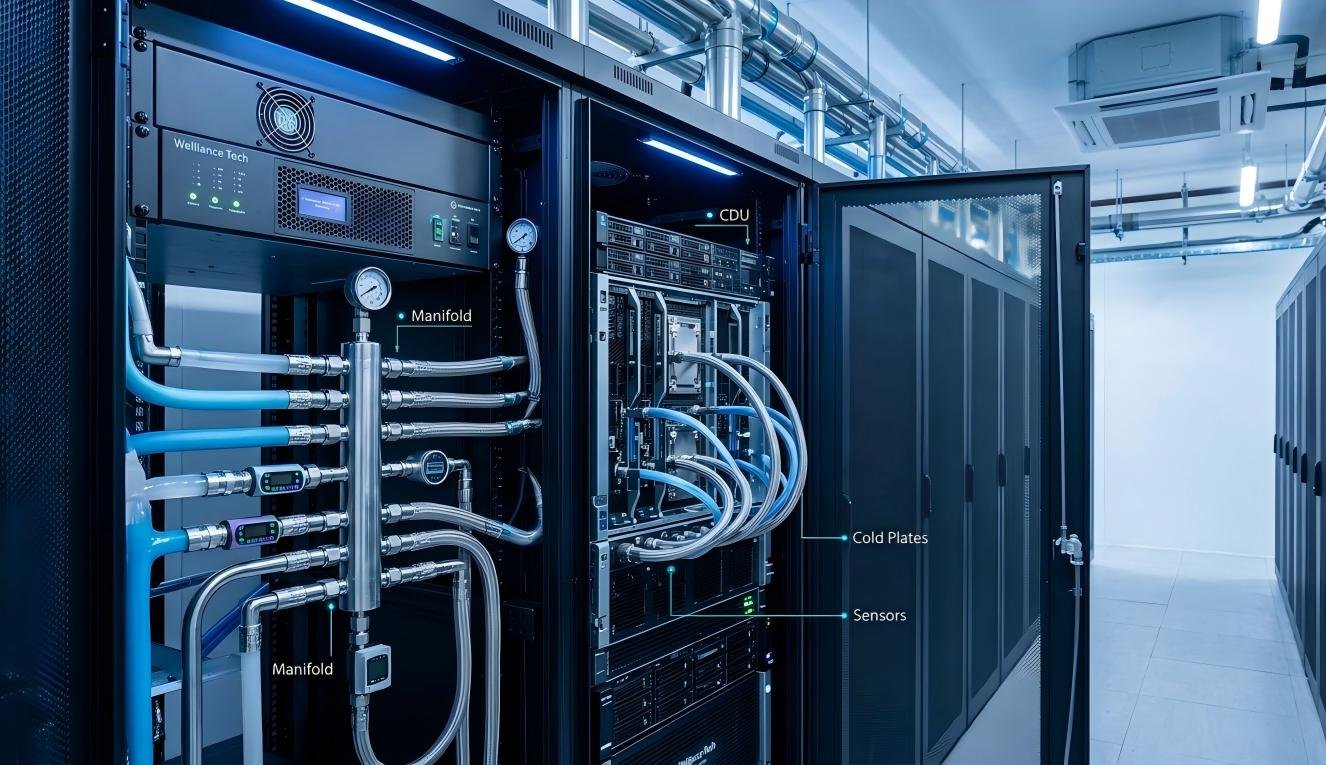
Liquid cooling can remove heat close to its source, reducing dependence on large volumes of room-level airflow. This makes it particularly relevant for high-density computing environments.
However, liquid cooling requires additional engineering considerations, including coolant compatibility, hydraulic design, leak detection, filtration, maintenance access, and integration with the facility’s heat rejection infrastructure.
2. Air Cooling vs. Liquid Cooling: Key Differences
The two technologies should be compared across the entire cooling system rather than by looking only at the cooling unit.
Comparison Factor | Air Cooling | Liquid Cooling |
|---|---|---|
Heat transfer medium | Air | Liquid coolant or dielectric fluid |
Heat removal location | Primarily through server airflow and room cooling | Near processors or within immersed IT equipment |
Typical equipment | CRAC, CRAH, in-row cooling, precision AC | Cold plates, CDUs, immersion tanks |
Airflow requirements | Relatively high | Lower for heat loads removed directly by liquid |
High-density rack suitability | Depends on airflow and cooling design | Particularly suitable for high-density applications |
Existing infrastructure | Often easier to integrate | May require new piping and coolant infrastructure |
Maintenance | HVAC filters, fans, coils, refrigeration or chilled-water components | Pumps, filters, valves, heat exchangers, coolant and leak detection |
Main operational concerns | Airflow distribution, hot spots, humidity and cooling capacity | Coolant quality, flow, pressure, leakage and component compatibility |
Scalability | Can be expanded through additional cooling capacity and airflow management | Requires coordinated expansion of liquid loops and heat rejection capacity |
Typical applications | Conventional enterprise and colocation facilities | High-density computing, AI and HPC environments |
Neither technology is universally superior. The right choice depends on the facility’s thermal load, IT equipment, existing infrastructure, and operational requirements.
2.1 Cooling Performance and Heat Removal
Liquid cooling has an important advantage when heat must be removed directly from high-power components.
Liquids generally have much higher volumetric heat capacity than air, allowing a relatively small coolant flow to transport substantial thermal energy. Direct-to-chip systems also place the heat exchanger close to the processor, reducing reliance on room-level air movement for that portion of the heat load.
Air cooling, however, remains effective for many conventional server environments. Properly designed CRAC or CRAH systems, combined with appropriate airflow management, can provide stable cooling across a wide range of applications.
A critical distinction is that direct-to-chip cooling does not necessarily remove all server heat. Some components may still rely on air cooling, depending on the server design.
For this reason, liquid-cooled racks often still require room-level air cooling to manage residual heat.
2.2 Energy Efficiency and PUE
Energy consumption is another major consideration.
Air cooling systems may consume significant power through:
Supply and return air fans
Precision air conditioning units
Chillers
Chilled-water pumps
Cooling towers, where applicable
Liquid cooling can reduce some air-moving requirements and may allow more favorable heat rejection conditions, depending on coolant temperatures, facility design, and local climate.
However, liquid cooling also introduces energy-consuming components such as:
Coolant circulation pumps
CDU pumps
Heat exchangers
Secondary cooling loops
Dry coolers or chillers
Therefore, liquid cooling does not automatically guarantee lower total energy consumption.
The overall result depends on the complete cooling architecture, including operating temperatures, equipment efficiency, control strategies, and heat rejection conditions.
Power Usage Effectiveness (PUE) is commonly used to assess facility energy efficiency:
A lower PUE indicates that less additional energy is consumed by facility infrastructure relative to IT equipment.
However, PUE alone does not measure the efficiency of an individual cooling unit or the energy consumed by the IT equipment itself. A proper comparison should examine cooling-system power, total facility energy, and operating conditions.
2.3 Installation and Infrastructure Requirements
Air cooling generally has a lower infrastructure barrier when a facility already has suitable HVAC systems, raised-floor or overhead air distribution, and adequate electrical capacity.
Typical requirements include:
CRAC or CRAH units
Air distribution pathways
Supply and return ducts or plenum arrangements
Chilled-water or refrigeration infrastructure
Hot aisle or cold aisle airflow management
Liquid cooling requires a different set of infrastructure components.
Depending on the design, these may include:
Primary and secondary coolant loops
CDUs
Coolant distribution piping
Pumps and heat exchangers
Isolation valves and service connections
Leak detection systems
Coolant filtration and monitoring
Heat rejection equipment
Existing facilities may need modifications to accommodate pipe routing, equipment access, floor loading, drainage considerations, and maintenance procedures.
For new facilities, these requirements can be incorporated into the initial mechanical and electrical design. Retrofitting an existing data center requires more detailed evaluation.
3. Which Cooling System Is Better for Different Data Center Applications?
The best cooling approach depends on the type of IT equipment and the thermal characteristics of the facility.
3.1 Traditional Enterprise Data Centers
Traditional enterprise data centers often operate with a mixture of general-purpose servers, storage systems, and networking equipment.
For these environments, air cooling is frequently a practical choice.
A well-designed system may combine:
Precision air conditioners
CRAC or CRAH units
Hot aisle and cold aisle arrangements
Cold aisle containment
In-row cooling where localized cooling is needed
The key is to ensure that the cooling system can deliver sufficient airflow to every rack without creating excessive bypass airflow or hot-air recirculation.
For facilities with moderate rack densities and established HVAC infrastructure, replacing the entire cooling architecture with liquid cooling may not provide sufficient operational or financial benefits.
3.2 High-Density AI and GPU Data Centers
AI training and high-performance computing environments can generate substantial heat within individual racks.
High-density GPU servers place significant thermal demands on the cooling infrastructure. As rack power increases, conventional room-level air cooling may become difficult to scale because of airflow volume, fan power, space limitations, and localized heat concentration.
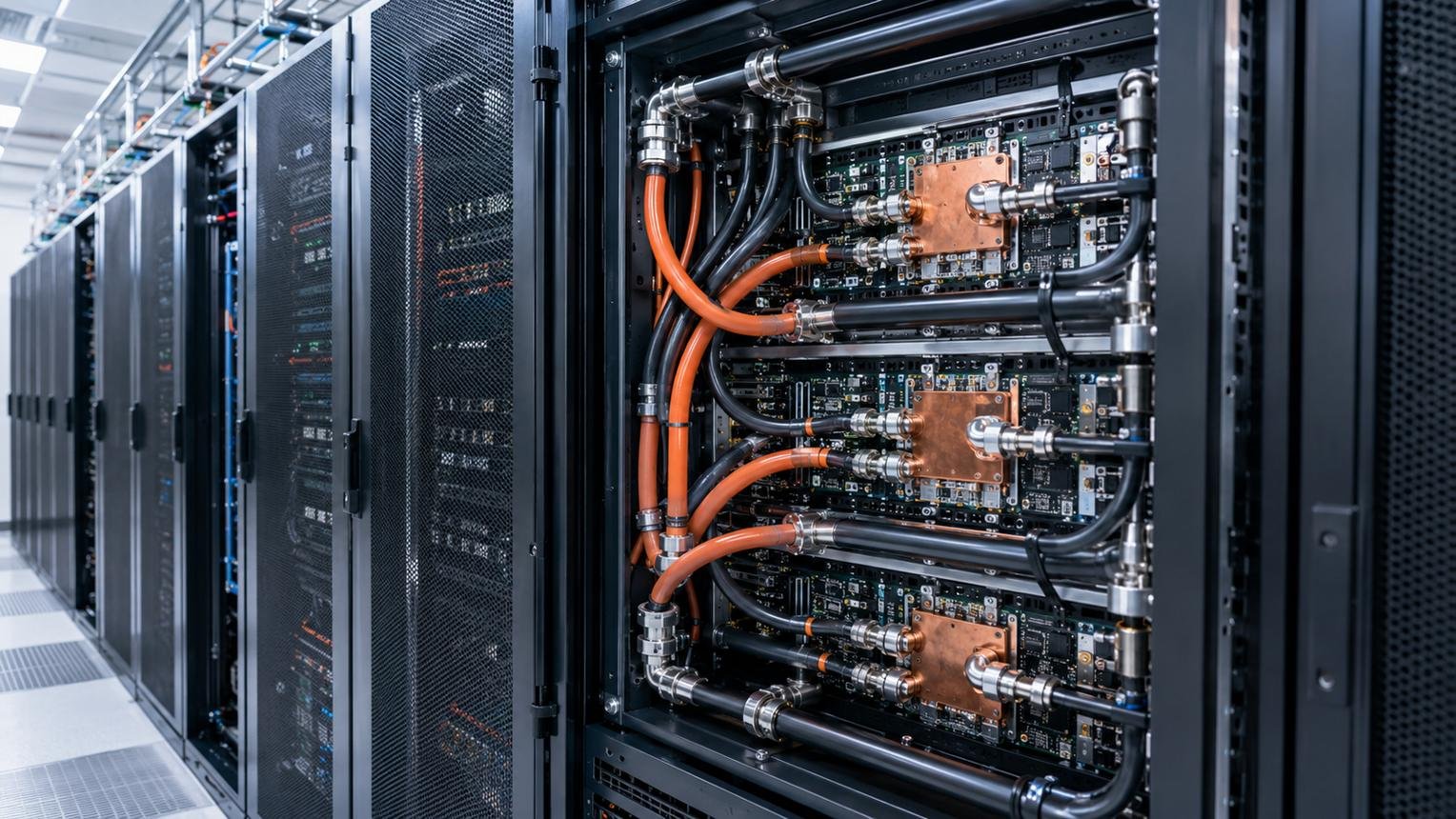
Direct-to-chip liquid cooling is therefore an important option for these applications.
It can remove heat directly from supported components, including CPUs and GPUs, through cold plates and coolant circulation loops.
A typical system may include:
Liquid-cooled GPU servers
Cold plates
Coolant distribution manifolds
CDUs
Facility water or another heat rejection loop
Dry coolers or chillers, depending on design conditions
However, not every AI rack has identical cooling requirements. Actual suitability depends on server specifications, component coverage, coolant supply temperature, flow requirements, pressure limits, and the facility’s ability to reject heat.
3.3 Colocation Data Centers
Colocation facilities serve customers with different server configurations and power-density requirements.
This makes flexibility particularly important.
A facility may use air cooling for conventional customer racks while providing liquid cooling infrastructure for customers deploying high-density GPU or HPC equipment.
Possible configurations include:
Conventional air-cooled server halls
Dedicated high-density zones
Liquid-cooled racks with CDUs
Rear door heat exchangers
Hybrid air and liquid cooling systems
A hybrid design can help operators support different customer requirements without converting the entire facility to one cooling technology.
3.4 Edge Data Centers
Edge facilities are often smaller and may operate in locations with limited space, restricted maintenance access, or challenging environmental conditions.
Air cooling can be suitable when the IT load and ambient conditions allow a compact, properly designed HVAC solution.
For higher-density edge deployments, in-row cooling or rear door heat exchangers may help manage localized heat.
Liquid cooling can also be considered where rack density or equipment requirements justify the additional infrastructure.
The final decision should account for local service availability, environmental conditions, equipment footprint, and the ability to maintain the cooling system.
4. What Are the Advantages and Disadvantages of Air and Liquid Cooling?
Understanding the practical trade-offs is essential before selecting a cooling architecture.
4.1 Advantages of Air Cooling
Established technology
CRAC, CRAH, precision air conditioning, and related HVAC technologies have long been used in data center environments. Many operators already have the expertise and maintenance procedures needed to manage them.
Compatibility with conventional IT equipment
Most standard servers are designed around airflow-based cooling. Air cooling can therefore support a wide range of equipment without requiring specialized liquid-cooled server configurations.
Simpler integration in existing facilities
Where suitable HVAC infrastructure is already installed, expanding or modifying an air cooling system may be more straightforward than introducing a new liquid cooling loop.
Flexible equipment selection
Operators can choose from room-level precision air conditioners, in-row systems, rear door heat exchangers, and airflow containment solutions to address different facility layouts.
4.2 Limitations of Air Cooling
Airflow limitations
High-density racks require substantial airflow. If the cooling system cannot deliver enough air at the required conditions, equipment inlet temperatures may rise.
Hot spots
Poor airflow distribution, cable obstructions, blanking panel gaps, and hot-air recirculation can create localized temperature problems even when average room temperature appears acceptable.
Space requirements
Air handling equipment, ducts, airflow pathways, and adequate service clearances occupy valuable facility space.
Fan energy consumption
Moving large volumes of air requires fan power. Poor system design or excessive airflow resistance can increase operating costs.
4.3 Advantages of Liquid Cooling
Direct heat removal
Cold plates transfer heat directly from supported components into coolant, reducing the dependence on room air for those components.
High-density application support
Liquid cooling is particularly relevant where processor heat loads exceed what the available airflow architecture can practically manage.
Potential for improved heat rejection efficiency
Depending on operating temperatures and climate, liquid cooling may support more efficient heat rejection or reduce reliance on mechanical refrigeration.
Support for future computing requirements
A properly planned liquid cooling infrastructure can provide a pathway for deploying newer high-density server platforms.
4.4 Limitations of Liquid Cooling
Higher system integration complexity
Liquid cooling introduces hydraulic components and interfaces that must be designed, installed, tested, and maintained correctly.
Leakage risks
Leaks can result from damaged connections, poor installation, material incompatibility, or component failure. Appropriate connectors, pressure management, leak detection, and maintenance procedures are essential.
Coolant management
Coolant quality, chemistry, filtration, and compatibility with wetted materials must be considered throughout the system lifecycle.
IT equipment compatibility
Not all servers support direct-to-chip liquid cooling. The server configuration, cold plate design, connection interfaces, and coolant requirements must be verified.
Additional maintenance skills
Facility teams may need training in liquid cooling operations, hydraulic isolation, coolant handling, and leak response.
5. How to Choose Between Air Cooling and Liquid Cooling
Selecting a cooling system should begin with the actual IT load and facility requirements, not with a preference for a particular technology.
The following factors should be evaluated before procurement.
5.1 Calculate the Actual Cooling Load
Start by identifying the heat generated by IT equipment.
For most data center cooling calculations, the IT electrical power ultimately becomes heat that must be removed from the facility, although the complete facility heat balance may include additional sources.
A simplified estimate is:
Where:
\(Q_{\text{IT}}\) = IT heat load
\(P_{\text{IT}}\) = IT electrical power
Both quantities can be expressed in kW.
This is a starting point, not a complete cooling capacity selection method. Engineers must also account for lighting, occupants, UPS and electrical losses, envelope heat gains, redundancy, and other relevant loads.
When evaluating rack-level cooling, collect:
Current and planned rack power
Maximum expected rack density
Server inlet temperature requirements
Component-level thermal design
Expected load variation
Future expansion plans
Do not size cooling equipment solely from average room power consumption. Localized rack loads can create thermal problems even when total room capacity appears adequate.
5.2 Evaluate Rack Power Density and Heat Distribution
Rack power density is one of the most important factors when comparing air and liquid cooling.
However, there is no single universal rack power threshold at which air cooling becomes unsuitable.
The actual limit depends on:
Server airflow requirements
Rack design
Available cooling supply conditions
Air distribution architecture
Containment effectiveness
Cooling equipment capacity
Environmental operating limits
If the facility experiences recurring hot spots or cannot deliver the required airflow without excessive fan power, localized cooling or liquid cooling may be worth evaluating.
5.3 Consider Existing Facility Infrastructure
Before selecting a system, determine whether the existing building can support the proposed cooling architecture.
For air cooling, check:
Available HVAC capacity
Chilled-water supply conditions, if applicable
Airflow pathways
Floor and ceiling constraints
Electrical capacity
Equipment access and service clearance
For liquid cooling, additionally check:
Available water or facility coolant infrastructure
Primary and secondary loop requirements
Pipe routing and connection locations
Required coolant temperatures and flow rates
Pressure and pressure-drop limits
Water quality or coolant specifications
Leak detection and isolation arrangements
Heat rejection capacity
A liquid cooling system should be evaluated as part of the complete facility thermal design, not as a standalone rack accessory.
5.4 Compare Total Cost of Ownership
The purchase price of cooling equipment is only one part of the investment.
A meaningful comparison should include:
Cost Category | Air Cooling | Liquid Cooling |
|---|---|---|
Initial equipment | Precision AC, CRAC/CRAH, containment and related equipment | Cold plates or immersion tanks, CDUs, pumps and heat exchangers |
Infrastructure | HVAC equipment, ducts, piping and electrical connections | Coolant piping, distribution systems, isolation and monitoring |
Energy | Fans, compressors, pumps and heat rejection | Pumps, heat rejection and any supporting air cooling |
Maintenance | Filters, fans, coils, refrigeration and water systems | Pumps, filters, valves, coolant and leak detection |
Retrofit cost | Depends on existing HVAC capacity | May require additional hydraulic infrastructure and server modifications |
Expansion cost | Additional air handling and cooling capacity | Additional liquid distribution and heat rejection capacity |
The financial comparison should consider expected operating hours, electricity prices, maintenance labor, equipment lifecycle, redundancy, and future expansion.
Liquid cooling may offer operational benefits in a high-density environment, but those benefits must be compared against the cost of the complete system.
5.5 Plan for Redundancy and Maintenance
Cooling system reliability is essential because cooling failures can affect IT equipment availability.
Both air and liquid cooling systems require appropriate redundancy and maintainability.
For air cooling, consider:
Redundant cooling units
Fan and compressor failure scenarios
Chilled-water availability
Control system reliability
Maintenance access
For liquid cooling, consider:
Pump redundancy
CDU serviceability
Isolation valves
Leak detection
Coolant monitoring
Filter replacement
Redundant heat rejection capacity
The design should allow maintenance activities to be performed without creating unacceptable thermal risks for operating IT equipment.
6. Is Hybrid Air and Liquid Cooling the Best Option?
For many modern data centers, a hybrid cooling architecture is a practical approach.
Rather than replacing every air cooling system, operators can use liquid cooling for high-heat-density components while retaining air cooling for residual server heat and other facility loads.
A hybrid architecture may combine:
Direct-to-chip liquid cooling for supported CPUs and GPUs
CDUs for coolant circulation and heat exchange
Precision air conditioners for room-level temperature management
CRAH or CRAC units for conventional IT equipment
Rear door heat exchangers for additional rack-level heat removal
Dry coolers or chillers for heat rejection
This approach offers several practical benefits.
Support for different rack densities
Conventional server racks and high-density GPU racks can use different cooling methods within the same facility.
More flexible infrastructure planning
Operators can introduce liquid cooling in selected zones rather than redesigning the entire data center.
Better alignment with IT upgrades
As server platforms change, cooling infrastructure can be expanded or modified according to actual equipment requirements.
Continued use of existing assets
Where existing air cooling equipment remains suitable, it may continue supporting conventional IT loads.
However, hybrid systems require careful coordination between air and liquid cooling. Engineers must understand how much heat is removed by each system and ensure that the remaining room-level cooling capacity is sufficient.
7. Common Mistakes When Selecting a Data Center Cooling System
Even technically capable projects can encounter problems when cooling decisions are based on incomplete information.
Avoid the following mistakes.
Mistake 1: Choosing liquid cooling simply because the facility uses AI servers
Not every AI workload requires the same cooling architecture. Check actual server thermal specifications, component coverage, and rack power before selecting equipment.
Mistake 2: Assuming air cooling is always cheaper
Air cooling may have lower integration costs in an existing facility, but high-density applications can require significant additional cooling capacity, airflow infrastructure, and fan power.
Mistake 3: Ignoring residual heat in liquid-cooled racks
Direct-to-chip systems do not necessarily remove all server heat. Power supplies, memory, storage, and other components may still contribute to the room heat load.
Mistake 4: Selecting a CDU without checking hydraulic requirements
The CDU must match the required coolant flow, temperature conditions, pressure limits, heat transfer requirements, and system configuration.
Mistake 5: Ignoring heat rejection infrastructure
A cooling system cannot perform as intended if the facility cannot reject the heat transferred from the IT environment.
Dry coolers, chillers, cooling towers, and associated pumps must be selected according to the actual system design and environmental conditions.
Mistake 6: Focusing only on initial equipment price
A low purchase price does not necessarily mean lower lifecycle cost. Energy use, maintenance, reliability, compatibility, and expansion requirements must also be evaluated.
Conclusion: Which Is Better, Air Cooling or Liquid Cooling?
Air cooling and liquid cooling serve different requirements in modern data centers.
Air cooling remains a practical and established solution for conventional IT environments, particularly where rack densities are manageable and suitable HVAC infrastructure is already available.
Liquid cooling is increasingly relevant for high-density AI, GPU, and HPC deployments where removing heat directly from processors or immersed components can address limitations associated with moving large volumes of air.
For many new and expanding facilities, hybrid cooling offers a flexible approach: liquid cooling handles supported high-heat-density components, while air cooling manages residual heat and conventional IT loads.
The right decision should be based on rack power density, IT equipment specifications, cooling capacity, facility infrastructure, energy consumption, reliability, maintenance requirements, and total cost of ownership.
Planning an air cooling, liquid cooling, or hybrid thermal management system?
Our data center cooling equipment portfolio includes precision air conditioners, CRAC and CRAH systems, in-row cooling, rear door heat exchangers, cold plate liquid cooling systems, CDUs, chillers, and dry coolers.
Click here to schedule a technical consultation for your data center cooling project. Share your rack power density, cooling requirements, facility conditions, and project plans so the appropriate equipment configuration can be evaluated.
Frequently Asked Questions
1. Is liquid cooling better than air cooling for data centers?
Liquid cooling is generally more suitable for applications requiring direct heat removal from high-power components, such as certain AI and HPC servers. Air cooling remains effective for many conventional data center environments. The better option depends on rack density, server specifications, infrastructure, and operating costs.
2. What is the main difference between air cooling and liquid cooling?
Air cooling uses conditioned air to absorb and transport heat from IT equipment. Liquid cooling uses circulating coolant or dielectric fluid to remove heat closer to the heat-generating components. Liquid cooling can transport substantial heat with less dependence on room-level airflow.
3. Can air cooling support AI data centers?
Yes, depending on the server configuration, rack power density, airflow requirements, and facility design. However, some high-density GPU deployments may exceed the practical airflow capabilities of conventional room-level cooling. Direct-to-chip liquid cooling or hybrid cooling may then be more appropriate.
4. Does liquid cooling reduce data center PUE?
It can contribute to lower facility energy consumption under suitable operating conditions, but the result is not guaranteed. Pump power, CDU efficiency, heat rejection equipment, coolant temperatures, and supporting air cooling all affect total energy use. PUE should be evaluated using the complete facility energy balance.
5. What is hybrid cooling in a data center?
Hybrid cooling combines air and liquid cooling within the same facility. For example, direct-to-chip liquid cooling can remove heat from CPUs and GPUs, while precision air conditioning manages residual server heat and conventional IT equipment.
6. What information is required to select a data center cooling system?
A technical evaluation typically requires:
Total IT load and planned expansion
Rack power density and rack layout
Server and GPU specifications
Cooling capacity requirements
Required supply and return temperatures
Available chilled-water or facility coolant conditions
Ambient design conditions
Redundancy requirements
Available installation space
Maintenance and operational requirements
For liquid cooling projects, coolant flow, pressure, fluid specifications, and equipment compatibility are also essential.