The ideal temperature and humidity for a data center are not simply a matter of keeping the room cold and dry. Operators must maintain suitable environmental conditions at the server air inlets, control moisture-related risks, and avoid unnecessary cooling that increases energy consumption.
For many air-cooled data center environments, the widely used ASHRAE recommended temperature range is 18°C to 27°C (64.4°F to 80.6°F) at the IT equipment inlet. Humidity should be managed using both relative humidity and dew point, rather than relying on a single fixed relative-humidity target.
The correct operating conditions depend on server specifications, equipment environmental class, air distribution, contamination levels, and the facility’s cooling design. This guide explains the recommended ranges, how to monitor them, and how to maintain stable conditions using appropriate data center cooling and precision air-conditioning systems.
1. What Is the Recommended Temperature for a Data Center?
For most conventional air-cooled IT equipment, ASHRAE’s recommended operating temperature range is 18°C to 27°C (64.4°F to 80.6°F), measured at the equipment air inlet.
This is a recommended operating envelope, not a requirement to set every data center’s room thermostat to a particular temperature. The objective is to ensure that the air entering servers remains within the appropriate environmental range.
Recommended vs. allowable temperature ranges
ASHRAE distinguishes between recommended and allowable environmental conditions. These terms should not be treated as interchangeable.
Environmental condition | Temperature range | Meaning |
|---|---|---|
Recommended | 18–27°C | Recommended operating range for air-cooled equipment classes A1–A4 |
Allowable A1 | 15–32°C | Wider operating envelope for equipment designed for Class A1 conditions |
Allowable A2 | 10–35°C | Wider operating envelope for equipment designed for Class A2 conditions |
Allowable A3 | 5–40°C | Wider operating envelope for equipment designed for Class A3 conditions |
Allowable A4 | 5–45°C | Wider operating envelope for equipment designed for Class A4 conditions |
These allowable ranges describe equipment operating limits under specified conditions. They should not be interpreted as preferred continuous operating targets for every facility. Equipment class, humidity limits, altitude, contamination, and other manufacturer requirements still apply.
handbook.ashrae.org+1
Why should data centers avoid unnecessarily low temperatures?
Running a data center at a very low temperature does not automatically improve reliability.
Excessive cooling can:
Increase compressor and chiller energy consumption.
Increase fan and pumping demand if the system is poorly controlled.
Create unnecessary temperature differences across the room.
Increase the risk of condensation on surfaces when moisture conditions are not controlled.
Raise operating costs without addressing airflow-related hot spots.
A better approach is to maintain suitable server inlet temperatures while improving airflow management and eliminating localized hot spots.
Practical recommendation: Use the server manufacturer’s environmental specifications and the applicable ASHRAE equipment class to establish the operating target. Do not use the room thermostat reading as the only indicator of server thermal conditions.
2. What Is the Ideal Humidity for a Data Center?
Humidity control is as important as temperature control. Excessive moisture can contribute to condensation and corrosion, while very dry conditions can increase electrostatic discharge concerns in certain environments.
However, data center humidity requirements cannot be accurately represented by one universal relative-humidity percentage.
Two measurements are particularly important:
Relative humidity (RH): The amount of water vapor in the air relative to the maximum amount the air could hold at that temperature.
Dew point: The temperature at which air becomes saturated and moisture begins to condense under the prevailing pressure.
ASHRAE’s 2021 thermal guidelines express the recommended moisture envelope for air-cooled A1–A4 equipment primarily through dew-point limits, with a relative-humidity ceiling that depends on environmental conditions and contamination considerations. The recommended envelope includes a lower moisture boundary of approximately −9°C dew point and an upper boundary of 15°C dew point, with a relative-humidity limit of 70% or a more restrictive 50% under specified higher-pollutant conditions.
handbook.ashrae.org+1
Why is dew point important?
Relative humidity changes when air temperature changes, even if the actual moisture content remains constant.
For example, air can show a higher relative humidity after being cooled, without additional water vapor being introduced. This is why RH alone can be misleading when evaluating conditions across different parts of a data center.
Dew point provides a more direct indication of moisture content and helps operators assess condensation risk.
A practical monitoring strategy should therefore consider:
Server inlet temperature.
Relative humidity.
Dew point.
Temperature and moisture conditions near cold surfaces.
Conditions inside liquid-cooled equipment areas, where applicable.
What happens when humidity is too high or too low?
Condition | Potential risk | Recommended response |
|---|---|---|
Excessively high moisture | Condensation on surfaces colder than the dew point; corrosion risk under certain contamination conditions | Investigate moisture sources, ventilation, cooling-coil conditions, and environmental controls |
Very low moisture | Increased electrostatic discharge risk in some operating environments | Review humidity and dew-point conditions against equipment requirements |
Rapid humidity fluctuations | Unstable environmental conditions and possible control problems | Check sensor accuracy, control sequences, and moisture sources |
High humidity with corrosive contaminants | Increased risk of corrosion to electronic components | Investigate air quality, filtration, and contaminant sources |
The objective is not to maximize or minimize humidity. It is to maintain the moisture conditions specified for the IT equipment while controlling contamination and condensation risks.
3. Why Temperature and Humidity Must Be Controlled Together
Temperature and humidity are closely related. A cooling system that controls temperature without properly managing moisture can still create operating risks.
Prevent condensation
Condensation occurs when a surface temperature falls below the dew point of the surrounding air.
This can happen around:
Chilled-water pipes.
Cooling coils.
Cold liquid-cooling connections.
Uninsulated valves and fittings.
Cold surfaces near humid outdoor-air infiltration.
For example, if the surrounding air has a dew point of 16°C and a pipe surface is at 12°C, moisture can condense on that pipe.
To reduce this risk:
Measure dew point in relevant areas.
Insulate chilled-water pipes and cold components appropriately.
Seal openings that allow uncontrolled humid air infiltration.
Inspect pipe joints, valves, and liquid-cooling connections.
Verify that the cooling system’s operating temperatures are compatible with the room’s moisture conditions.
Liquid-cooled data centers require particular attention to the relationship between coolant temperature and room dew point. The acceptable coolant supply temperature depends on the server and cold-plate design, the cooling architecture, and the condensation-control strategy.
Avoid temperature fluctuations
Rapid changes in temperature can create control instability and may affect equipment operation.
Common causes include:
Cooling units cycling on and off too frequently.
Incorrect temperature sensor placement.
Poor coordination between multiple precision air conditioners.
Sudden changes in IT load.
Uncontrolled airflow from adjacent spaces.
Improper cooling system control settings.
Operators should investigate the cause of fluctuations rather than simply lowering the cooling setpoint.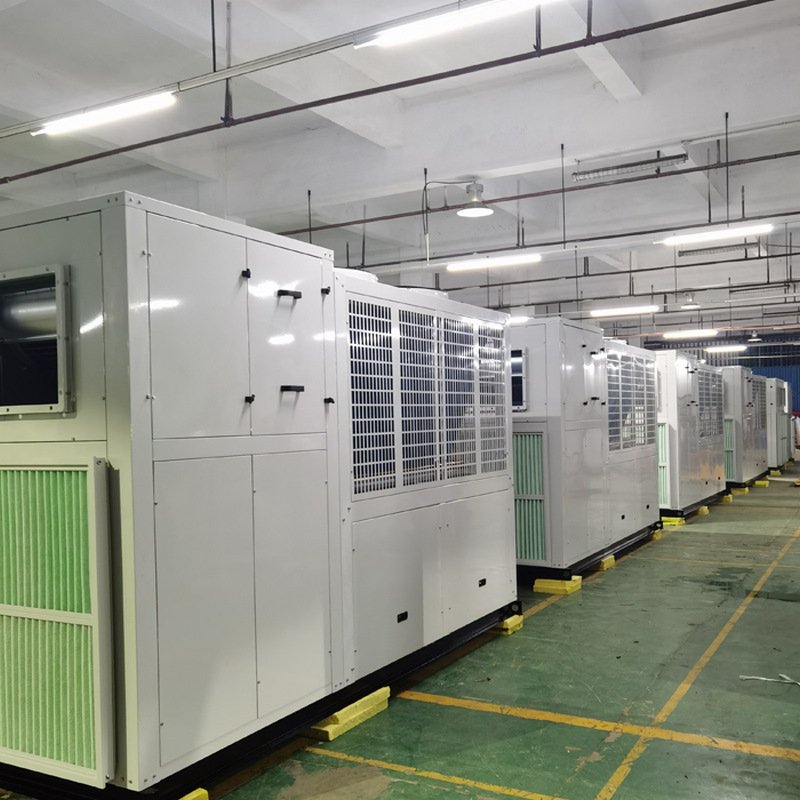
4. How to Monitor Data Center Temperature and Humidity Correctly
A room-level temperature reading cannot reliably represent conditions at every server inlet.
Warm air can accumulate in certain rack locations even when the average room temperature appears acceptable. This is particularly common when supply and return airflow paths are poorly designed.
Measure temperature at the server inlet
For air-cooled equipment, the most relevant measurement is the temperature of the air entering the IT equipment.
Sensors should be positioned at representative rack inlet locations, including:
Lower rack inlet areas.
Middle rack inlet areas.
Upper rack inlet areas.
High-density racks.
Racks located near airflow obstructions or potential hot spots.
The exact monitoring arrangement should reflect the rack layout, equipment requirements, and facility design.
Use environmental monitoring systems
A data center environmental monitoring system can collect temperature, relative humidity, and other operating data from multiple locations.
Useful monitoring capabilities include:
Rack-level temperature monitoring.
Relative-humidity monitoring.
Dew-point monitoring or calculation.
High- and low-temperature alarms.
Humidity and dew-point alarms.
Historical trend analysis.
Integration with building management or data center infrastructure management systems.
Monitoring point | What to measure | Why it matters |
|---|---|---|
Rack front | Server inlet temperature | Indicates the actual air temperature entering equipment |
Rack rear | Exhaust-air temperature | Helps identify heat removal and airflow problems |
Cold aisle | Temperature and humidity | Evaluates supply-air conditions |
Hot aisle | Temperature | Helps assess return-air conditions |
Chilled-water pipes | Pipe surface temperature and room dew point | Helps identify condensation risk |
Liquid cooling loop | Coolant temperature, flow, and pressure | Supports liquid-system operation and troubleshooting |
For high-density GPU environments, monitoring should also consider rack-level thermal variation and the temperature conditions required by the server manufacturer.
What should trigger an alarm?
Alarm thresholds should be based on the IT equipment specifications and the facility’s operating strategy.
Typical alarm categories include:
Rack inlet temperature approaching the upper operating target.
Temperature exceeding the configured limit.
Humidity or dew point moving outside the approved range.
Unexpected temperature differences between rack positions.
Loss of communication with environmental sensors.
Abnormal coolant temperature, flow, or pressure in liquid-cooled systems.
Avoid setting alarms using generic values without checking the equipment requirements. Alarm thresholds should also allow enough time for operators to investigate and respond before equipment conditions become critical.
5. How to Maintain Stable Temperature and Humidity
Maintaining suitable environmental conditions requires more than installing a precision air conditioner. Air distribution, cooling capacity, humidity control, equipment placement, and operating procedures must work together.
Use precision air conditioning for controlled environments
Precision air conditioners are designed for environments with continuous heat loads and more demanding temperature and humidity control requirements than many conventional comfort-cooling applications.
Depending on the system architecture, data centers may use:
CRAC units: Typically direct-expansion systems that use a refrigeration circuit to cool room air.
CRAH units: Typically chilled-water air handlers that use a cooling coil supplied by a central chilled-water system.
In-row cooling: Places cooling equipment close to server racks to address localized heat loads.
Rear door heat exchangers: Remove heat from rack exhaust air through a heat exchanger mounted at the rear of the rack.
Cold aisle containment: Separates cold supply air from hot exhaust air to reduce mixing and improve airflow management.
The appropriate solution depends on IT load, rack density, room layout, available utilities, and the required redundancy.
Improve airflow management
Even when the installed cooling capacity is sufficient, poor airflow can cause hot spots.
Common problems include:
Missing blanking panels that allow hot air to recirculate.
Unsealed cable openings beneath racks.
Obstructed perforated floor tiles.
Poorly arranged supply and return air paths.
Excessive mixing between hot and cold air.
Cooling units that do not distribute air evenly.
Practical improvements include:
Separate cold supply air from hot exhaust air using appropriate aisle containment.
Install blanking panels in unused rack spaces.
Seal unnecessary openings in raised floors and cable penetrations.
Keep supply-air paths clear of obstructions.
Adjust airflow based on actual rack demand.
Monitor rack inlet temperatures after making changes.
Do not assume that increasing fan speed or lowering the supply-air temperature will solve every hot-spot problem. The underlying cause may be airflow bypass, recirculation, or an uneven rack load.
Coordinate cooling and humidity control
Cooling coils can remove moisture when their surface temperature is below the entering air’s dew point. In some facilities, humidification or dehumidification equipment may also be required to maintain the specified environmental conditions.
A suitable control strategy should consider:
Room temperature and humidity sensors.
Cooling coil operating conditions.
Humidifier and dehumidifier control, where installed.
Outdoor-air moisture loads.
Condensate drainage.
Sensor calibration.
Coordination between multiple cooling units.
Avoid unnecessary humidification or dehumidification. Both processes consume energy and should operate only when required by the environmental control strategy.
6. Special Considerations for AI and High-Density Data Centers
AI training systems and GPU clusters can create concentrated rack-level heat loads. This makes temperature management more challenging than in facilities where IT loads are distributed relatively evenly.
A room can have an acceptable average temperature while individual high-density racks experience excessive inlet temperatures.
Why high-density racks need closer monitoring
High-density server racks may have:
Higher power consumption per rack.
Greater airflow requirements.
More concentrated heat generation.
Greater sensitivity to airflow restrictions.
Cooling requirements that differ from neighboring racks.
Facility operators should assess rack-level conditions rather than relying exclusively on room averages.
When should liquid cooling be considered?
Liquid cooling may be appropriate when air cooling alone cannot efficiently manage the required rack-level heat load or when the server platform is designed for liquid cooling.
Technology | How it manages heat | Important temperature considerations |
|---|---|---|
Precision air cooling | Cools room air and supplies it to server inlets | Requires suitable inlet conditions and airflow distribution |
In-row cooling | Removes heat close to high-density racks | Requires coordinated air delivery and return paths |
Rear door heat exchanger | Transfers heat from rack exhaust air to a liquid loop | Requires suitable water temperatures and condensation control |
Direct-to-chip cooling | Transfers heat from selected components through cold plates | Requires compatible coolant conditions and liquid distribution |
Immersion cooling | Transfers heat from compatible hardware into dielectric fluid | Requires fluid, tank, and heat rejection conditions specified for the system |
Direct-to-chip liquid cooling does not necessarily eliminate the need for room air conditioning. Components not directly cooled by cold plates may continue to release heat into the room.
Similarly, immersion cooling has its own thermal and fluid-management requirements. It should not be treated as a conventional air-conditioning application.
Control condensation in liquid-cooled systems
The coolant supply temperature must be evaluated against the room’s dew point and the temperatures of exposed system components.
If a coolant line or fitting operates below the surrounding air’s dew point, condensation may occur unless the system is specifically designed to prevent it.
Before commissioning a liquid-cooling system, verify:
Coolant supply and return temperatures.
Room dew-point conditions.
Pipe and fitting insulation.
CDU operating limits.
Coolant flow and pressure.
Leak detection and alarm arrangements.
Server and cold-plate compatibility.
The correct operating conditions must be established from the server manufacturer’s requirements and the liquid-cooling system design—not from a generic room-temperature recommendation.
7. Common Temperature and Humidity Control Problems
Problem | Possible cause | Recommended action |
|---|---|---|
High server inlet temperature | Insufficient cooling, poor airflow, or hot-air recirculation | Check rack inlet readings, airflow paths, and cooling capacity |
Uneven rack temperatures | Uneven IT loads or poor air distribution | Review rack density, containment, and supply-air balance |
Excessive humidity | Moist outdoor air infiltration, moisture sources, or incorrect controls | Investigate infiltration, ventilation, and humidity-control equipment |
Very low humidity | Dry outdoor conditions or excessive dehumidification | Review moisture control against equipment requirements |
Condensation on pipes | Surface temperature below surrounding air dew point | Check insulation, coolant temperatures, and moisture conditions |
Frequent temperature fluctuations | Control instability, poor sensor placement, or rapid load changes | Review sensor locations, control sequences, and equipment coordination |
Cooling equipment runs continuously | High heat load, poor heat rejection, or airflow problems | Check actual load, filters, coils, fans, and heat rejection conditions |
When troubleshooting, compare measurements from multiple locations and examine historical trends. A single sensor reading may not reveal the underlying problem.
8. Frequently Asked Questions
1. What is the ideal temperature for a data center?
For many air-cooled data center environments, the recommended server inlet temperature range is 18°C to 27°C (64.4°F to 80.6°F), following ASHRAE thermal guidelines. The appropriate target depends on the IT equipment specifications and facility design.
2. What is the ideal humidity for a server room?
There is no single relative-humidity percentage suitable for every data center. Operators should follow the applicable equipment environmental requirements and monitor both relative humidity and dew point. ASHRAE’s recommended moisture envelope for air-cooled equipment uses dew-point limits and a relative-humidity ceiling that depends partly on air contamination conditions.
3. Is 30°C too hot for a data center?
A 30°C server inlet temperature is above the commonly recommended 18°C–27°C range. Some equipment classes have wider allowable operating ranges, but allowable limits should not automatically become normal operating targets. Check the server manufacturer’s specifications and investigate whether airflow or cooling problems are causing the elevated temperature.
4. Should data center humidity be 40% or 60%?
Neither value is a universal requirement. A fixed RH target can be misleading because relative humidity changes with air temperature. Use the applicable equipment environmental envelope, monitor dew point, and consider contamination levels when establishing humidity-control settings.
5. What happens if a data center is too humid?
Excessive moisture can create condensation on surfaces below the air’s dew point. In the presence of certain contaminants, higher humidity can also contribute to corrosion. Operators should investigate moisture sources, outdoor-air infiltration, cooling-coil conditions, and the effectiveness of environmental controls.
6. How often should data center temperature and humidity be monitored?
Environmental conditions should be monitored continuously in critical data center spaces. Sensors should cover representative rack inlet locations and other areas where temperature or moisture conditions may differ. Monitoring systems should record historical trends and provide alarms when conditions approach or exceed approved operating limits.